Quick way to transfer settings from V25 to V26

Hi everyone,
Is there a fast and easy way to transfer my settings (ribbons, toolbars, workspaces, custom settings, etc.) from BricsCAD V25 to V26?
I’d like to avoid manually reconfiguring everything. Is there a recommended method or tool to do this efficiently?
Thanks in advance for any tips!
Comments
-
I don't have a real complicated setup as I'm mostly in the 2D workspace using toolbars. Switching to V26 was mostly painless as it ported over a lot from my V25 install. Had to manually arrange my toolbars to my liking as usual but that was never that big of a deal. Using profiles or CUI partial import etc. never worked for me 100% as far as porting over the toolbar arrangement but was probably doing it wrong.
The confusing thing is when installing a new version it asks you if you want the the updated toolbars which begs the question does that negate the use of importing a user profile or CUI partial file?
0 -
there are severel things that I do.
- All your CUI files and the startup files located in "C:\Users\User\AppData\Roaming\Bricsys\BricsCAD" in the version folder (V25 for example), and it remain even after a new version instalation.
- locate your existing CUI you use in V25 (right click on empty space in ribbon → customize and you will see it in search bar on the top.
- copy this file to the same location (if exsit in V26 copy the exiting one to other folder to save it ) and replace it with the V25 version in the V26 folder, and when you start V26 go to custmize again and load it as the current CUI file.
- if you entred data to "on_doc_load.lsp" and/or "on_start.lsp" copy them to V26 in the same place and replace the existing ones.
- if you used the appload command to load lisps copy and replace "appload.dfs" as well, run "appload" and check the autoload check box's.
that is what I do.
Aridzv.
0 -
Have you looked at Profiles ? These are loaded when you say select the Bricscad icon. If you look at the ICON left click and select properties. You can change the profile used. Need to change "Target". Add the /P option to the Target settings of the BricsCAD shortcut
As an example we had Laptops that were used in the field we had two icons one for in office the other as look local.
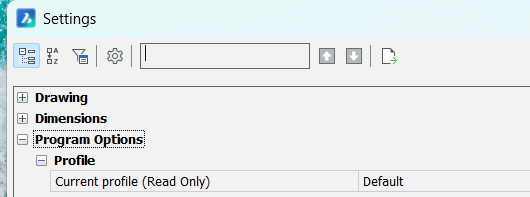
Found it Profilemanager
https://www.bricsys.com/en-au/blog/how-to-save-and-import-your-custom-bricscad-settings?srsltid=AfmBOoryrDXVkDgHTxflkbbrLWDXeFADHxXYATsN1dNcoFcSKuWnRP45
Ok another way I have an Install lisp it sets all the relevant stuff up, Support paths, menus, DWT, Temp directory path, toolbars and so on. We used this when updating versions a fairly simple task. Took a couple of minutes. I had like 12 copies to update.
1 -
I only work in model space for house design. When updating from V25 to V26 I chose in the setup to port over all settings from V-25. This did not work, or at least I am not sure what ported over for my screen arrangement did not. I used the profile manager method found on google. That worked, however when I closed and opened the program the next day all the settings were from V25 were lost and it was just as before. I also have had issued with setting preferences for each drawing file as a default for all future drawing files or import, but I have to redo everything with each new file used with V25. I have only had V26 for a short while and don't yet see any improvement over V-25.
Thoughts or comments, even if not positive, would be appreciated.
0 -
To use the profile set up you have to edit the dektop icon, it has the current profile setting, so I am not sure but if you import a profile yes it exists but maybe only in current session. I would make a copy of the Bricscad desktop icon and paste agin on desktop you will now have 2 icons, If you right click the icon you get Properties click on it. From memory need to change the target and add the /P "profilename", do a GOOGLE. "add profile bricscad" "run different profile on startup Bricscad"
In Acad the /p is there, I am sure google will reveal correct setting. You can rename the 2nd icon.it is in General. It may be different with Bricscad. Did you set the imported profile "As Current"
0

