Has anyone managed to Jig a Table using dotNet C# in BricsCAD?

Has anyone managed to Jig a Table using dotNet C# in BricsCAD?
I have been trying to use the "Jigging a table" plugin from Autodesk forum, which works in AutoCAD, but not in BricsCAD for some reason.
The Table Jig doesn't show during drag. The table shows after insertion but not during drag.
Any ideas or experiences?
Thanks.
0
Comments
-
In BRX, you have to call recomputeTableBlock, here’s a quick sample in Python
import traceback
from pyrx import Ap, Db, Ed, Ge

class TableJig(Ed.Jig):
    def __init__(self, table: Db.Table, basepoint):
        Ed.Jig.__init__(self, table)
        self.table = table
        self.lastPoint = basepoint
        self.curPoint = basepoint

    def sampler(self):
        self.setUserInputControls(
            Ed.UserInputControls(
                Ed.UserInputControls.kAccept3dCoordinates
                | Ed.UserInputControls.kNullResponseAccepted
            )
        )
        ds, self.curPoint = self.acquirePoint(self.lastPoint)
        if self.curPoint.distanceTo(self.lastPoint) < 0.001:
            return Ed.DragStatus.kNoChange
        self.table.transformBy(Ge.Matrix3d.translation(self.curPoint-self.lastPoint))
        self.lastPoint = self.curPoint
        return ds

    def update(self):
        return True


@Ap.Command()
def doit():
    try:

        db = Db.curDb()
        table = Db.Table()
        table.setTableStyle(db.tablestyle())
        table.setDatabaseDefaults(db)
        table.setSize(5, 4)
        table.generateLayout()
        table.recomputeTableBlock(True)

        jig = TableJig(table, Ge.Point3d.kOrigin)
        jig.setDispPrompt("\nPick end Point")
        if jig.drag() != Ed.DragStatus.kNormal:
            print("oops")
            return

        db.addToModelspace(table)
    except Exception as err:
        traceback.print_exception(err)
0 -
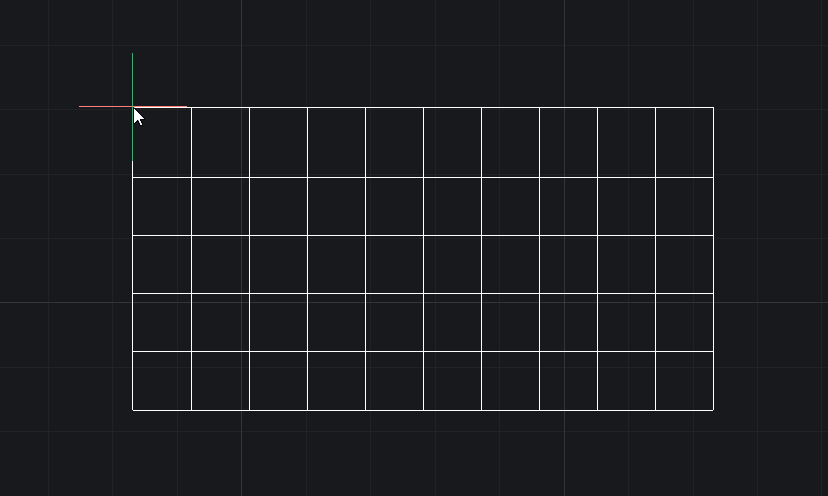
correct here is a sample in C# with an option for number of columns and rows.

Attached at the cursor is the icon of the real table …. !
public class TableJig : EntityJig
{
Point3d position;
private int _rows;
private int _cols;Database db = Application.DocumentManager.MdiActiveDocument.Database; public TableJig(int rows, int cols) : base(new Table()) { _rows = rows; _cols = cols; Table table = Entity as Table; table.TableStyle = db.Tablestyle; table.SetDatabaseDefaults(db); table.SetSize(_rows, _cols); table.Position = position; table.GenerateLayout(); table.RecomputeTableBlock(true); } protected override SamplerStatus Sampler(JigPrompts prompts) { JigPromptPointOptions opts = new JigPromptPointOptions("\nSpecify insertion point: "); PromptPointResult res = prompts.AcquirePoint(opts); if (res.Status != PromptStatus.OK) return SamplerStatus.Cancel; if (res.Value == position) return SamplerStatus.NoChange; position = res.Value; return SamplerStatus.OK; } protected override bool Update() { try { Table table = Entity as Table; if (table.Position.DistanceTo(position) > 1.0e-4) { table.Position = position; return true; } } catch (System.Exception) { } return false; } public Entity GetEntity() { return Entity; } public int Rows => _rows; public int Cols => _cols; } /// TABLEJIG Command [CommandMethod("TABLEJIG")]
public static void TableJigRC()
{
Database db = Application.DocumentManager.MdiActiveDocument.Database;
Editor ed = Application.DocumentManager.MdiActiveDocument.Editor; // Prompt for rows and columns PromptIntegerOptions rowOpts = new PromptIntegerOptions("\nEnter number of rows: "); rowOpts.AllowZero = false; rowOpts.AllowNegative = false; rowOpts.DefaultValue = 3; PromptIntegerResult rowRes = ed.GetInteger(rowOpts); if (rowRes.Status != PromptStatus.OK) return; PromptIntegerOptions colOpts = new PromptIntegerOptions("\nEnter number of columns: "); colOpts.AllowZero = false; colOpts.AllowNegative = false; colOpts.DefaultValue = 3; PromptIntegerResult colRes = ed.GetInteger(colOpts); if (colRes.Status != PromptStatus.OK) return; using (Transaction tr = db.TransactionManager.StartTransaction()) { TableJig jig = new TableJig(rowRes.Value, colRes.Value); PromptResult res = ed.Drag(jig); BlockTable bt = (BlockTable)tr.GetObject(db.BlockTableId, OpenMode.ForRead, false); BlockTableRecord btr = (BlockTableRecord)tr.GetObject(bt[BlockTableRecord.ModelSpace], OpenMode.ForWrite, false); Table table = jig.GetEntity() as Table; table.SetSize(jig.Rows, jig.Cols); btr.AppendEntity(table); tr.AddNewlyCreatedDBObject(table, true); tr.Commit(); } }2 -
Table 5 rows x 10 columns on cursor jigging…
 0
0 -
Thanks everyone,
It looks like I was missing setting the table style:
table.TableStyle = db.Tablestyle;
Now it works as expected.
Thanks again!
2

