BLOCKIFY - Block Duplicates - EDIT : meanwhile part of OVERKILL

With the release of early Blockify I thought there once came an option to merge identical Block Definitions.
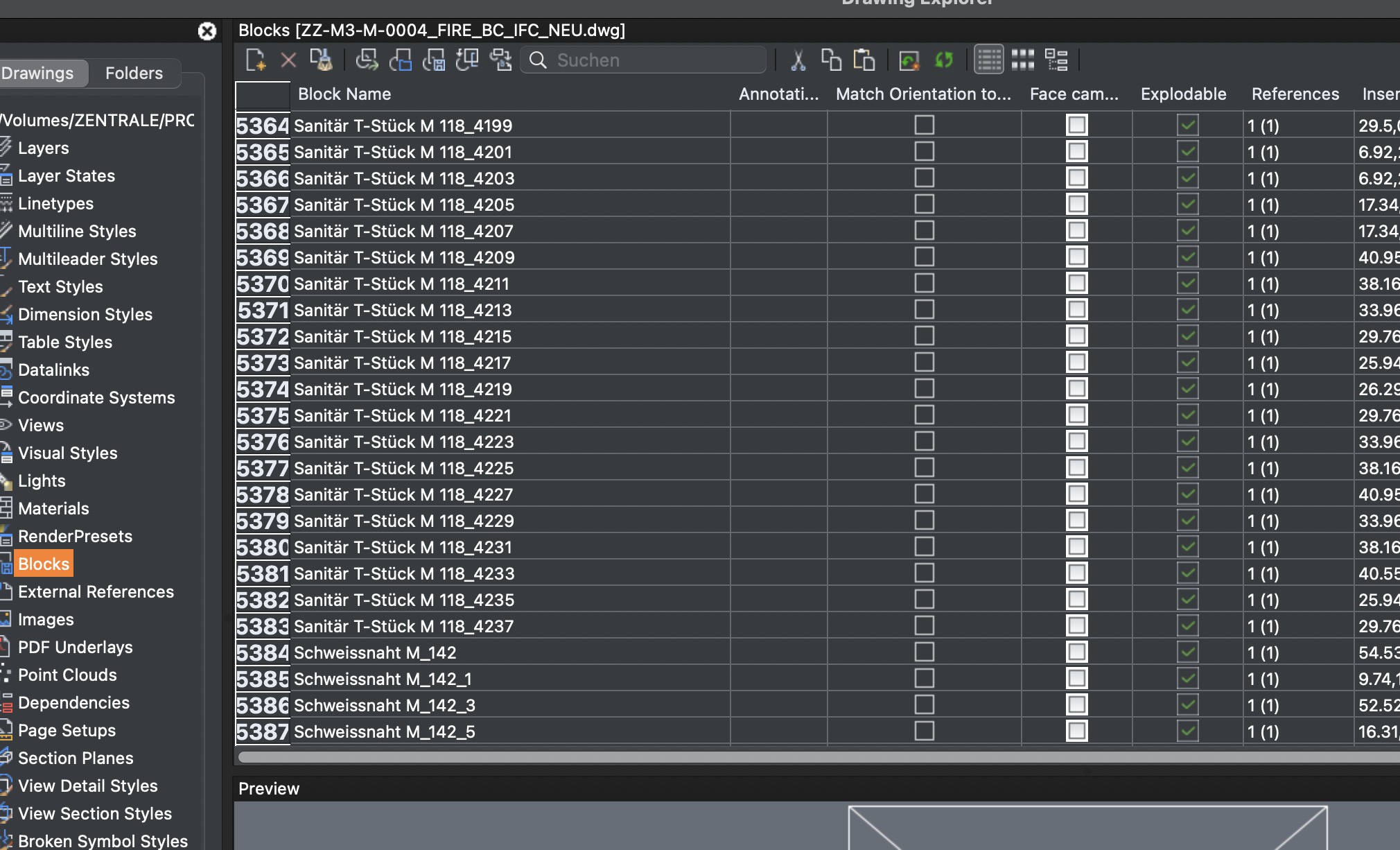
For me, somehow most/all of clients IFC exports (or RVT too ?) lead to same Elements imported as Blocks, to have each a unique Block definition. I never could see any differnces in their parent geometry, Properties or attributes, but these are duplicated definitions. And each Block definition has only 1 Reference and a rising number suffix in its name. And therefore that file has about 5500 Blocks.
However Blockify was never able to purge/combine these into one definitions. AFAIR it said "no identical Blocks" and I think I had a already SR about this.
So these, mostly around 500 MB IFCs, were hardly usable in Bricscad, and normally I would have needed to combine 5-7 of these from different parties to get the complete BIM Model - which was illusionary.
I recently tested them with Blockify again to see if it works better now - without luck, but if I watch the Blockify options, language barrier, but for me it doesn't look like any of these is meant to combine duplicate Blocks ?
So, is that feature gone, was never there or am I using it still wrong and it could work ?
Comments
-
As I see in your old request about this issue, changing of tolerance setting was suggested as a possible solution. Did it work for you?
0 -
Hmmh, I have not yet tried.
(An older File, not a current urgent Project. Just an example of what sources I may have to deal with and wanted to re-test Bricscad's current state)
Currently I am no more sure if Blockify ever had any option to check for Block Duplicates in the Block Library (?) or by its Instance Copies in the Drawing ? If you read the help or look at Blockify options, there is nothing like that mentioned anywhere.
Maybe I just always mixed that up with the option - to search the Drawing for Geometry that is the same as in an already existing Block ?
With Duplicates I mean that the Blocks are totally identical in content (geometry + data) except for their Block Name, which just has differs in a Suffix _number. These are valid Block definitions and each Block has a single Instance (Reference) in the Drawing.
I wonder even why Bricscad creates Blocks at all (In lack of more reasonable alternatives in DWG standard ?) As the source IFC has no Blocks (IFC Types) at all. Also Vectorworks does not create any Blocks (Symbols). In IFC or VWX these are just Objects.
Looks like this example originates from Microstation or better a vertical HVAC App on top. Everything is IFC tagged with default IfcBuildingElementProxy only and the Geometry (Fire Sprinkler) crappy loose 3D Faces, at least Regions in Bricscad.
Basically similar to what you get by DGN imports for any former Microstation "Smart Solid", which is a standard Solid that was edited, by a Tool like PushPull or boolean operations.An other option to purge/convert these Blocks and in Bricscad is also not existing - or better applicable. As Blockreplace is only able to replace a single Block, not multiple at a time. Which does not make much sense when there are 2000+ of these.
I also miss the option to select all Block Duplicates in Drawing Explorer, to delete - with an option to keep/explode potential "References" in the Drawing.
So if I am not wrong, there is only one option in Bricscad left (?), to XPLODE all Block's Instances in the Drawing first. Delete all but the first Block Definition, then run Blockify and hope it will accept and find a bunch of preselected loose Regions Geometry and finally recognize its Copies in File as already existing in a Block Definition.
Unfortunately also hardly applicable as Bricscad is already overburdened with the File as it is. And I do not really get why when I explode such Block Copies References, the laggy File Size (IFC was 480 MB) increases from DWG 880 MB to 1.46 GB and memory consumption from 50+ GB to 70+ GB.
I started Blockify but quit it after running 1-2 hours, as I was not sure if I really had selected the correct option. Maybe I had, as it jumped back to that expected option after I quit. Looks like Blockify Panel switches to first option when starting, as long as it is running ?
My current and most comfortable solution so far is to open the IFC in Blender Bonsai.
- duplicating such an IFC Object
- creating an IFC Type from it
- select all Object Duplicates by searching by Name
- apply the IFC Type to all
BTW,
Merry Christmas to all …..
0 -
hi Zoomer,
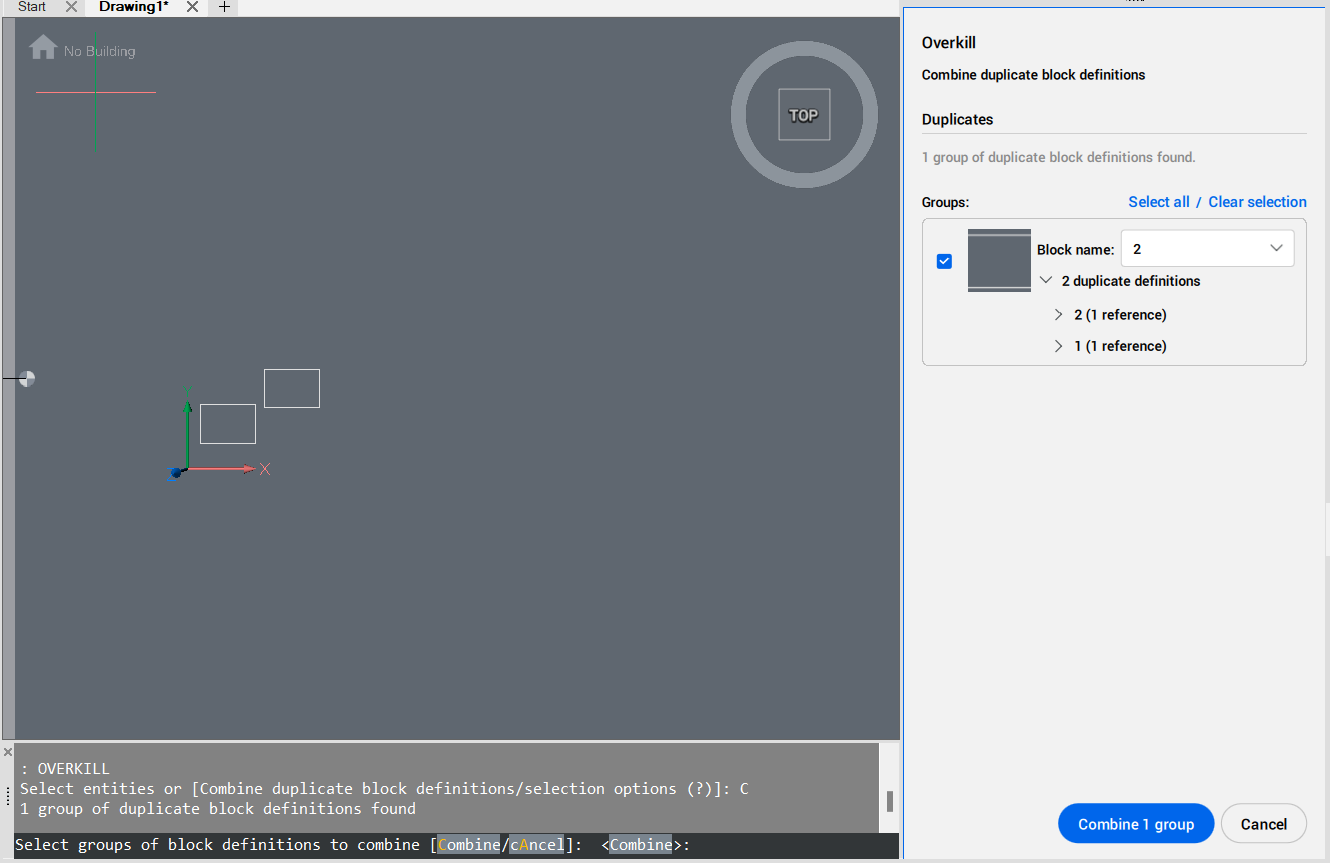
this is part of the OVERKILL command, as a command option. See screenshot below:
 0
0 -
Thanks a lot Piet !
Sounds exactly like what I am looking for.
I started a test. It is already running since 2+ hours. I will let it run until tomorrow and come back if it ran through or aborted, found something or not.
0 -
That is a long time, could you create a support request and attach the drawing so we can profile it?
0 -
I think it is still under NDA.
But it is large …. the IFC is nearly 600 MB (or 400 MB zipped), the Bricscad file also 800+ MB.
Bonsai also needed 1-2 hours for assigning a single IFC Type to 2500+ Sprinkler IFC Elements. Which I repeated for 3 Types - just for testing, not for all possible duplicates - which already saved half of the IFC file size. Importing the cleaned up IFC into Bricscad does work without lagging too.
There is no feedback, no progress bar for OVERKILL, if Bricscad is still working or already frozen, which Bricscad on Mac often does, like after Mac awakes from sleep.
I will let it run until tomorrow to give it at least a chance. So far Bricscad only needs 26 GB of memory.
0 -
OK, 48+ hours later I have no result (doesn't mean that it is totally unlikely that Bricscad is still working) so I will quit now.
Maybe I will stripp down a Bicscad file and try again.
0 -
Forgot to stop Bricscad - it was not just frozen - now after 3 days it had a result.
Looks like overkill runs single-threaded (?) not sure how many CPU cores I have but it uses max 10% of CPU(s). MT Flags are on.
I did not exceed the tolerance, so the output was marginally. About 130 (of 5500+ Blocks) duplicates found. So file size went only down from about 800 to 700+ MB.
So I went back to the last IFC import where I manually assigned the Blocks/OFC Types to Sprinklers in Bonsai, which had halved the file size and ran overkill over it. Same tolerance but to ignore all other options. Looks like it found again the same about 130 Blocks. Lots of 1 REF per Blocks left.
I'll try a "0.001" tolerance (INSUNITS Meters)
0 -
0.001 gave another Block with only 2 References ….
Testing 0.01 now.
And for me it looks a bit like OVERKILL does not recognize rotated obejects (?)
I went step by step from 0.1 to 100 …. no duplicates found.
0 -
“OVERKILL does not recognize rotated objects”
Sounds like OVERKILL is inspecting the geometry via the references and not the records. Seems you may need something more specialized to analyze and combine records, then rematch the records to the references. Geometry in the records would be invariant to the reference’s scale or rotation.
What’s the geometry, solids, or simple primitives? If I had a drawing, I could attempt rolling a routine.
edit:
Thinking about this more, if this imported from IFC? It might be easier to find something the examines the IFC before the geometry is generated. Also, what about the IFC data? Part numbers or other relevant data could become a mess if the routine is only looks at geometry
0 -
I wrote a concept routine to compare blocks by geometry. This this actually a very difficult task, so the routine is flawed.
But. #SR 181854 is blocking, I posted the concept here
https://www.theswamp.org/index.php?topic=60513
0 -
Unfortunately the geometry itself is quite bad. Sometimes 3D Solids or Meshes, sometimes a few Regions or 2-Poligons that look planar and appear as Solids - or a mix of all that inside a Block.
The IFC source seems to have been Microstation. Microstation's Solids (Parasolid Modeling Core like Vectorworks) get "Smart Solids"as soon as you do some edits, like boolean operations or push/pull. Smart Solids also do not DGN-import to Bricscad as proper Solids and end as loose 3D Faces or Surfaces. In the past, when I modeled with Microstation, 95% of my geometry also ended being smart solids.
Not sure why geometry looks similar here, although it went through IFC.
AFAIR Microstation's basic Solids come over by DGN imports as ACIS 3D Solids. But in this IFC case many rounded basic objects like cylinders are polygonal like a Mesh. Therefore the geometry is much more ressource hungry than necessary and Bricscad lags.
Sounds like OVERKILL is inspecting the geometry via the references and not the records. Seems you may need something more specialized to analyze and combine records, then rematch the records to the references. Geometry in the records would be invariant to the reference’s scale or rotation.
No clue what OVERKILL is searching for.
I always wondered why Bricscad does not find duplicates although for me the geometry for me looks identical in Blocks and References in the model. Not sure what else information is attached to Blocks, beside the IFC info, which should also be identical.
The only difference for me are Blocks name's ascending numbers suffix.I thought there might also be some inaccuracies - but that should have been solved by coarse tolerance.
When i looked at some other ignored Block duplicates with same name prefix and looking at their thumbnails, it might be that some looked like being same geometry but rotated about Z at 90 or 180 degree.
I think those have initially never been real Blocks/Cells before. Maybe "anonymous" Cells or more likely Parts, similar to a BIM Door or Window. At least there also was no Block/References concept in the IFC - no "IFC Types"
So the most promising workflow may be to EXPLODE or XPLODE all Blocks and let BIMIFY do its job to find all appearances and create a single Block for these.
If only that may not take days or weeks and that Bricscad is already overburdened with the amount of data.
0