Hatch pattern bad orientation

Hi guys, please help.
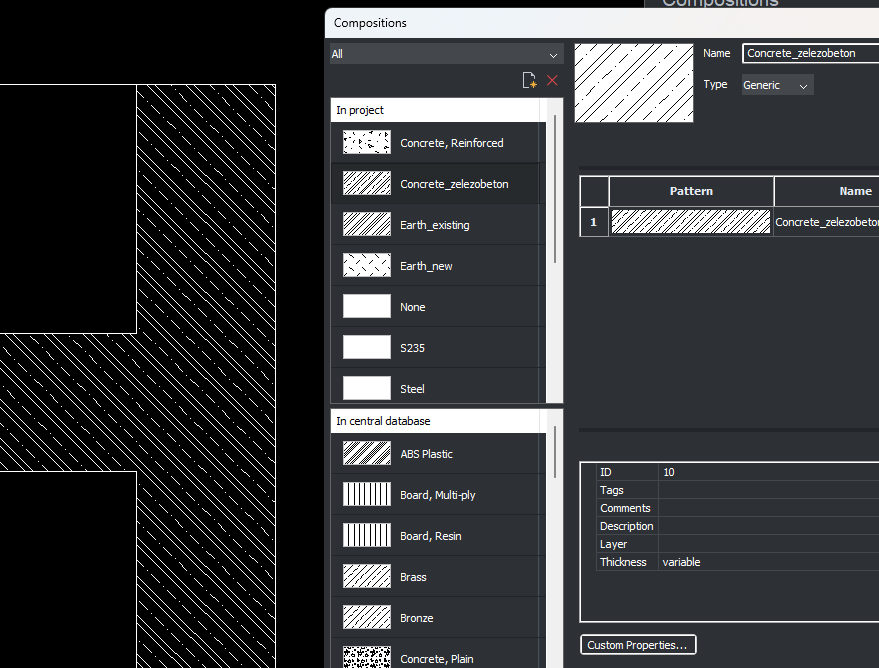
Why is the orientation of the generated section view like this?
Thanks
Comments
-
What's wrong wi'it?
0 -
Upside down. And 10x scale?
I filed SR155956 three years ago (see below) and seen practically no improvement to tools or settings for BIM-generated drawings since then. The hatch reversal I can live with, the hatch scale is a bigger nuisance. These are but two of many stubborn shortcomings in the control of 2D output from BIM that I have reported and await remedy.
Material hatches in section and elevation views appear 10 times larger than expected and in section cuts appear upside down. For section cut hatching, this happens both in the model and in the generated drawings. [By the way, it would be useful to have a toggle to show/hide elevation material hatches in the 3D model clip display views.]
The documentation for Physical Materials states under • Section settings:
"3. Define the Scale.
The final pattern scale in a section is the product of the Scale setting of the physical material and the value of the Scale property of the BIM section. As a result, the printed scale of the hatch pattern is independent of the section plane scale."
and under • Elevation settings:
"...See the Section settings above, except for the Scale setting. The elevation hatch is independent of the Scale property of the BIM section."
It says, "except for the Scale setting", yet there seems to be no difference. Both types of hatches (section and elevation fill) depend on the BIM viewport scale. Is there another scale setting I'm missing?reply from Bricsys:
Thanks for letting us know. I can confirm the behavior you told us about. Hatches are generated 10 times larger in both sections and elevations and are displayed upside-down in section intersection fills. I will report this issue to the development team.
I see there is some confusion as well regarding the scaling of intersection fills hatching in our documentation article. I'll forward a notice about this to the documentation team as well.
As for your request on a toggle to show/hide elevation material hatches in the 3D model clip display views, you might get the desired result by using Live Section instead of Clip Display. You can customize the global display of all visible entities of your model and the section intersection lids as well. You can activate and configure Live Section from the Drawing Explorer.
Unfortunately, I can't provide a better workaround at the moment than manually scaling BLMATREIALS scaling down by 10. Unfortunately, this will have the adverse effect of scaling everything again when the issue will be fixed. I am not sure at the moment if Typed Plans are also affected. I'll do more testing and let you know.Neither the functionality nor the documentation has improved, and I don't know if any testing was ever done because, as commonly happens, my support request was "closed" even though the problem remains.
1 -
I see
0 -
The bad thing is that the hatch pattern orientation appears not only in the generated drawing but also in the 3D model when sectioned :(
And the "jogged section plane" creates very bad things too…
0
