New version 26 fix for new Status Bar

Good day— I installed version 26 1.06 Without any problems. 🎉 After a couple of days I upgraded the status bar to the new version. And then I noticed that my entity snap or esnap wasn't showing any indicators. I went through all the variables and settings, I tried different drawings with the same problem, I rebooted my system to no avail. And then I reverted the status bar back to the original and the problem did not go away.
I then looked at the settings and saw the "Ignore entity snap elevation" was off. I enabled that setting and Poof ! It was fixed. I then enabled the new status bar again and the same behavior repeated (No Indicators). I right clicked on the E snap portion of the new status bar saw there was a slide button for" Ignore entity snap elevation", enabled it and it was fixed again. 👍️
This sort of thing can be very frustrating And scary. I was glad to be able to just calmly go through and find a solution, I hope this helps someone. Thank You
Comments
-
I think the Status bar is not related here, because OSNAPZ is not saved anyware by design. So when you change USENEWSTATUSBAR variable and restart program to get new Status bar displayed - OSNAPZ become 0, it's expected behavior.
More interesting why snap indication depends on OSNAPZ on your side. Do you work in 3D?0 -
Good day and thank you. In working with my situation I realized I brought in elements from an Autocad drawing I made in 2020. No I'm not a time traveler i'm just old. I've been working with CAD since 1988 or I guess it's been working on me really.😀
The initial problem of the E snap markers or symbols not being visible did not happen on drawings without the elements from the old Autocad drawing. If I keep everything Bricscad there's no problem. Over the years I had seen this kind of thing before, but it has not happened in so long I forgot about it. Even copying and pasting from one drawing to the next seems to bring in scripting elements that confuse other CAD packages. BRICS CAD still functions and I'm still able to make the drawing it's just looking for a very slight Change in the area i'm trying to attach a line to the midpoint or endpoint to see if going to attach, witch it does.
The behavior or symptom was pretty exclusive to the model space. Once I started using paper space I was getting the 3D symbol color. I configured model space to have red symbols and 3D they have blue symbols.
I also reinstalled my NVIDIA driver which is the studio version for the 5060 PNY GPU. This didn't affect the situation . I do a driver assessment every week and make sure everything is up to date. I have been building my own computers since the late 80s and am well aware of how the hardware and software issues can send us humans in circles.🙄
I will try to get short 20 or 30 second video of what I'm talking about as it is kind of indescribable. It's almost like the symbol itself becomes clear. I'll you'll see what I mean Post it to comment later today.
Also, I am just assuming this is the correct place to bring something like this up. I looked for a feedback web page or tab or something and couldn't find it on the BRICSYS website.
Again thank you and I'll get that video up as soon as I can.
0 -
Sounds rather curious. It would be useful to create a support request indeed and provide example drawing for investigation.
"I looked for a feedback web page or tab or something and couldn't find it on the BRICSYS website." - please follow these instructions:
0 -
Good morning—-
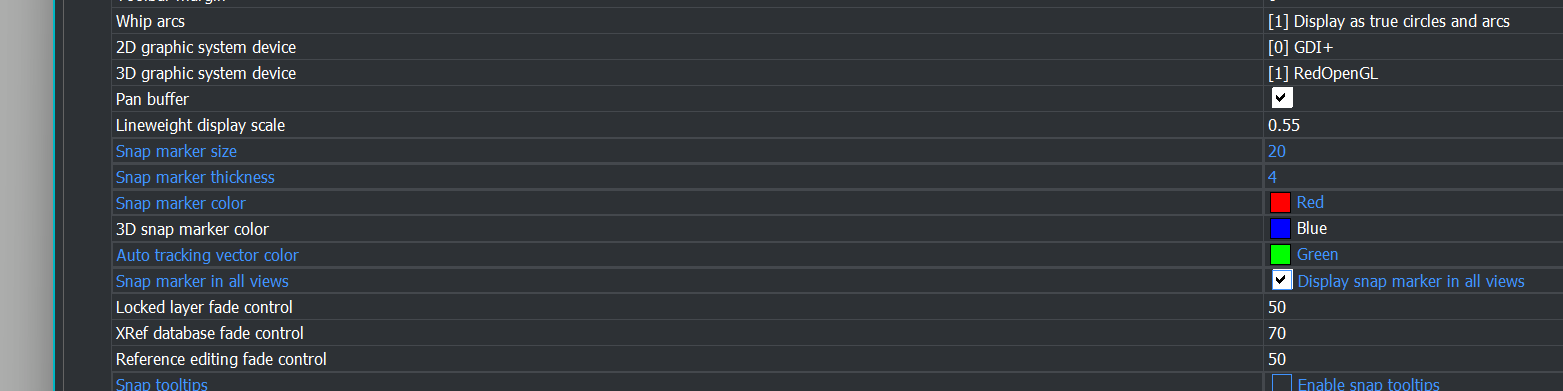
The behavior bricks CAD is repeatable and I have made two videos. The first one is with the indicators not apparently working although if you look closely at Model view you will faint images where the triangle for midpoint square for end point etc seem to show.
The second video shows the indicators working as expected in both the model and the layout views. Yes the layout view is generating a blue indicator which is the color of the 3D indicating system.
The change in behavior occurred on its own without any input from me, apparently overnight. I started it up this morning and poof it worked. Although modeling the may have affected it Hope this helps👍️
Thank you
 0
0 -
I will submit support request this afternoon (Local Time PST) I have started a business and have a few clients to accommodate - Thank you
0 -
About the "disappeared" E-snap markers look at this topic.
0 -
Please attach to the request your current User profile also, you can export it via PROFILEMANAGER command → select current profile → press Export and give a name to created .arg file.
This doesn't look like AUTOSNAP reset, which is mentioned above, more likely this is some combination of settings in profile and drawing.
0 -
Good day Lyubov - I have submitted the support as requested. Thank you
0 -
I have lost all snaps today except for insertion, setting osnapz to 1 has re-enabled snapping, my drawing is 2d. osnapz on 0 loses all snaps. i have tried inserting erverything into a new drawing, but its the same. i should have stuck to v24….
0 -
Right, Autosnap seems to have fixed it!
0 -
Good afternoon Pads. Yes, "AUTOSNAP=127" seems to bring back the snap function. So far it's been very consistent and I've only had to use it three times since I learned about it last month.
0 -
Yep 127. Its just happened again, I had to google search for this thread to find the fix. At least i remembered where to look…
I think next time I'll wait for the first service pack before upgrading, I should have known better.
0 -
Good day - I run Win 11 and thus I use Google Keep with my Chrome Browser. I can put all of the notes I need in Google Keep, like "Autosnap = 127".
No software is perfect. I am glad to have easy solutions for Brics CAD.
0 -
I've been seeing this intermittently as well, I didn't think OSnapZ has anything to do with it, but it certainly seems to in the video demonstration…hrm peculiar!!
When I notice no snap markers, I visit Settings and notice 'AutoSnap' has everything switched off, which I obviously didn't do. I manually have to check then following:
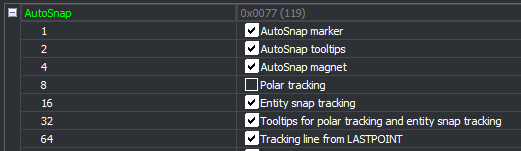
I use OSnapZ regularly but AutoSnaps are not switch off after every use, so there's soemthing else going on, or that it is that i'm not using the toggle in Snap menu from StatusBar…???
As for OSnapZ 'Replace Z value with current elevation' this is critical for use in a 3D setting. Why on earth after all these years OSnapZ hasn't been given a dedicated Toggle Key & Icon in the Statusbar next to 'Snaps' is beyond me, because it's impossible to work in 3D on a UCS without it. Other software have Snap Modes like '3D' (essentially OsnapZ OFF) and 'Plane' (essentially OSnapZ On) for tasks on a Workplane (UCS) those are in the status bar in their own section and switched with a drop down menu, it cannot be missed (Tekla Structures).
Many years ago, my solution was to in CUI, duplicate a command and make a Shortcut Key, assign F2 key to toggle OsnapZ On/Off and delete the F2 Open History.
Here is the Macro Code:
^C^C(setvar 'osnapz (abs (1- (getvar 'osnapz))))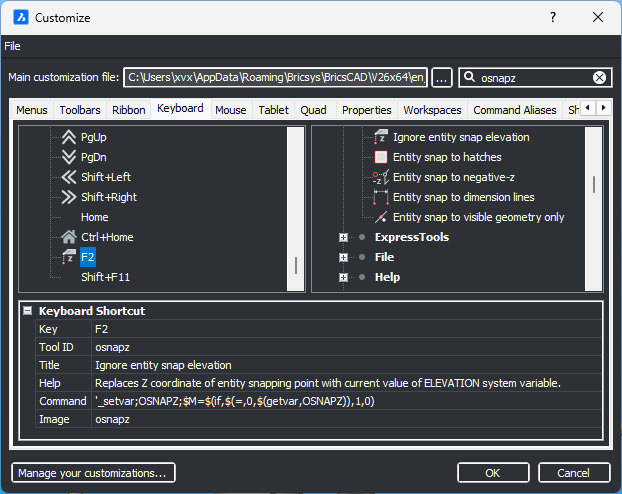
But the problem was user cannot visually see any indication if it is on or off, (hence a dedicated OSnapZ Icon in Status Bar would have been useful/essential) so when forgetting to switch it on/off, the consequences after many commands before realising it is on/off was disastrous.
Solution now days is to create command macros in right click menu, essentially a UCS & View for each side of a cube, will switch to the UCS, change Visual Style to 2DWireFrame and Switch OSnapZ On.
IDK if the Quad can be customised with these commands like the Right Click Menu.
Sample:
Left UCS OsnapZ_1
^c^c_-view;_left;_osnapz;1;vs;2;After finishing the tasks on the UCS, I right click select UCS World, this command macro will also change the Visual Style back to Shaded with Edges and switches OSnapz off.
Sample:
^c^c_ucs;_w;_osnapz;0;vs;e;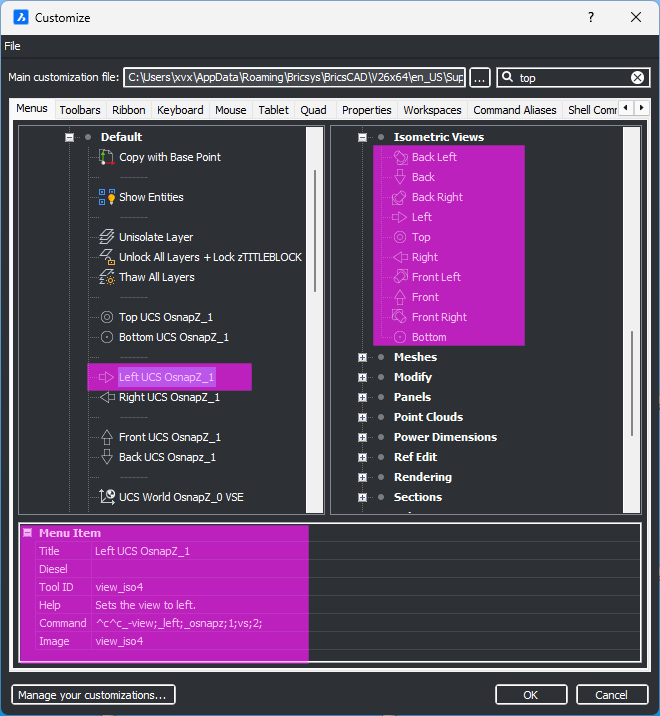
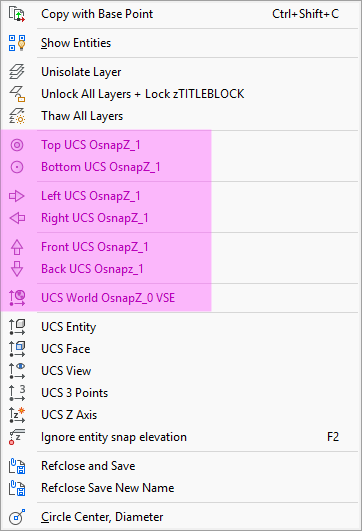
Left UCS OsnapZ_1
^c^c_-view;_left;_osnapz;1;vs;2;Right UCS OsnapZ_1
^c^c_-view;_right;_osnapz;1;vs;2;Front UCS OsnapZ_1
^c^c_-view;_front;_osnapz;1;vs;2;Back UCS Osnapz_1
^c^c_-view;_back;_osnapz;1;vs;2;Top UCS OsnapZ_1
^c^c_-view;_top;_osnapz;1;vs;2;Bottom UCS OsnapZ_1
^c^c_-view;_bottom;_osnapz;1;vs;2;UCS World OsnapZ_0 VSE
^c^c_ucs;_w;_osnapz;0;vs;e;0 -
My autosnap still occasionally gets reset to 0, the attached lisp should start a reactor which will monitor osnapz and autosnap and set them to 127 and 0 whenever they are changed. P
0 -
Osnap values can be reset very easily using OSMODE variable. A few simple defuns via appload on startup.
My usual
(defun c:47 ( / )(setvar 'osmode 47))
We had like 4 different ones.
0 -
Could you tell me please, does it happen in V26.1.08 or previous V26.1.07? The problem with Autosnap reset should be fixed in V26.1.08, but if it still happens, this need to be investigated.
0 -
Hi Lyubov.
Im currently on 26.1.06. I'll update and keep an eye on it. Thanks
0