New release, the usual rubbish upgrade experience

So today i have installed v26 alongside v25 that I have a BIM permanent license for under a current maintenance.
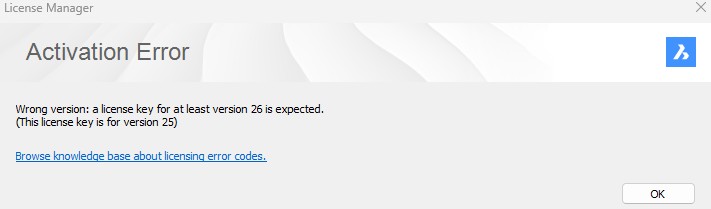
When I try to run v26, I get the license pop up that is populated with my key and it rejects the license on the ground it is a v25 license and a v26 one is expected.
Go over to my account and there it clearly states that my v25 license key is updated and supports v26.
If you are going to bring out a new version every year, is it to much to ask that the process of doing it just "works"
After all, I am paying a maintenance for this and I can't use the product!
Comments
-
If you have an actual maintenance contract, it can be more efficient to create a support request to get help faster.
I'm not expert in licensing, but I found the next information in the Help: "If the update of your license was not automatically detected, retrieve your key from the My Licenses section in your account. Next, go to the License Manager dialog box, select Activate Now and enter your key." Did you try this?
0 -
Yes, it didn't work. See image
 0
0 -
And this is what my online License manager says:
 0
0 -
Could you please create a support request, providing all these information?
0 -
We are leaving BricsCAD. Been with the software several years, but greed on a lapsed maintenance means we are now ceasing further investment. Our only interest in v26 was to get away from v25, which was much slower and inferior to v24 in our experience. Seems in a busy year we missed the reminder email. Offered to pay it, but expected to pay double instead. Result, a lost customer who will be reverting to v24 and paying zero towards the software's future.
1