EXPORTPDF, How to Export only paper space sheets ?

I'm new in BricsCAD, usually I have drawings with many paper spaces and I want to export only the paper space sheet's for PDF with one command like EXPORTPDF. The problem is: always the first page in PDF is the model space, so, I would like to export all sheet (paper spaces) but not the model space, it is possible?
Comments
-
Use the PUBLISH command instead. It allows you to select just your paper space layouts and direct the output to PDF.
0 -
Custom lisps can be used to plot only the layouts this is one example. plots a range of layouts and goes to correct printer including PDF. It is called from a POP menu where we had multiple destination printers.
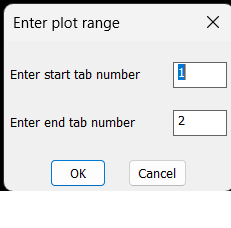
It is hard coded to suit where I worked title block. But you can change the window values.
2 -
Am I missing something, Print vs Export, when the desired output is pfd file(s)? For each paperspace Layout, why not simply Print>PrintAsPDF.pc3 (which is inbuilt in BricsCAD)?
0 -
Yes, for single page works well, but when I have multiple layouts exportpdf is more fast and useful then use publish (in AutoCAD).
The problem is PUBLISH needs to be configured for every document.
For example, if I have 10 documents with 2~50 layouts to generate PDF I must reconfigure PUBLISH in all 10 drawings, even though if all layouts page setup configured.
Thanks for help!0 -
Hi Alanh,
Exactly. After researching, I found that the best solution is to implement custom code.
I’ll create a .NET API command to integrate it more efficiently.
Thanks for your help!0 -
Hi Jason,
That is one solution, but the way EXPORTPDF works in BricsCAD doesn’t make much sense to me.
In AutoCAD, EXPORTPDF is extremely useful for quickly generating PDFs and sharing drawings with clients.In BricsCAD, EXPORTPDF always includes both model space and paper space.
So if paper space is empty, I get a blank page; and if I’m working in paper space, the model space still becomes the first page of the PDF.This makes the command difficult to use in real workflows.
I’ll create a custom button to handle this properly.
Thanks for your assistance.
0 -
On EXPORTPDF have you tried raising a support request? It seems reasonable their should be an option to control what is exported. potentially it's a bug. The PDFLAYOUTSTOEXPORT setting infers that it should be paper space layouts only.
With PUBLISH have you investigated creating .DSD files? This could be created programmatically, then called using the -PUBLISH command. It is possible to specify a pagesetup overrides to your preferred print options.
Jason Bourhill
CAD Concepts Ltd
0


