Setting the order of Custom Sheet Set Properties

Anyone know of any utility for user to manually change the order of the Sheet Set Custom Properties?
The Custom Properties dialogue UI is hard fixed A-Z no ability to move anything up or down to set the desired order, and this order should be also displayed in the Sheet Set Manager Panel under Custom Sheet Set Properties.
I want the order list in SSM Panel to be the same sequential order of the Title block, Left to Right - Top to Bottom.
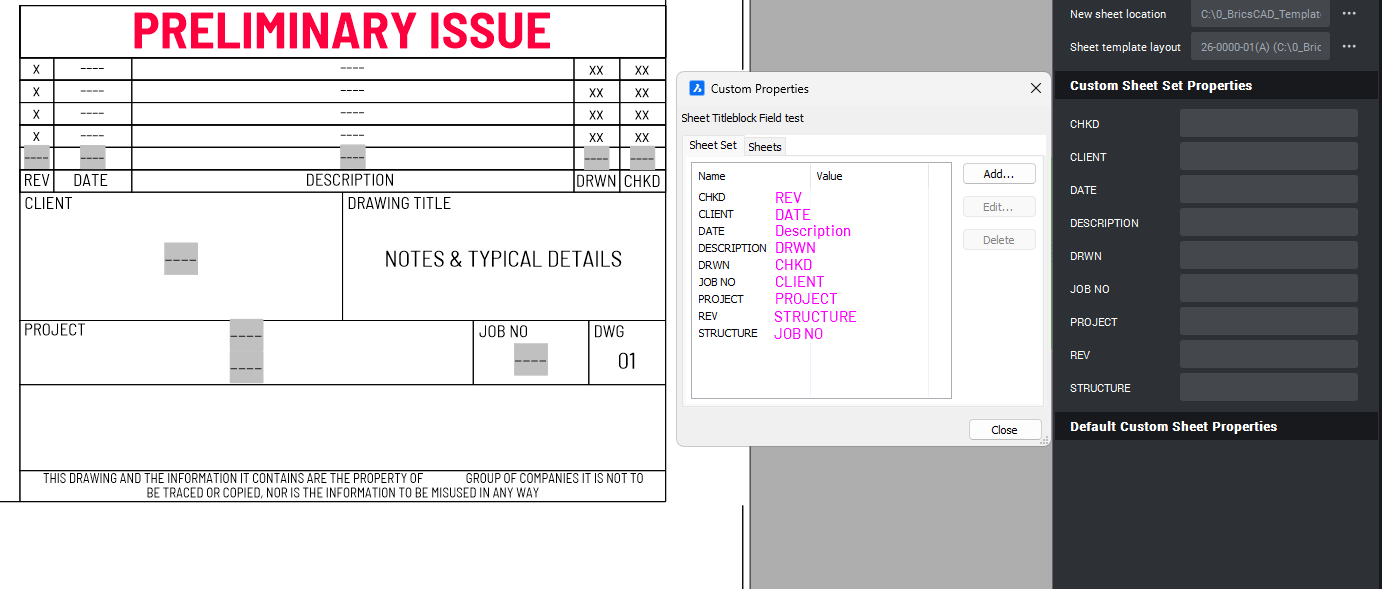
Similar tool for DWGPROPS would be fine
EditCustomProperties.lsp
Comments
-
Have you thought about adding a item number to each line then "1-abc" will be 1st item. Not tested.
0 -
I wrapped the sheet set API in Python. I have no idea how to use it though. What’s interesting is that they are sorted in AutoCAD
@Ap.Command()
def doit2():
    try:
        path = "C:\\Users\\Dan\\Documents\\AutoCAD Sheet Sets\\Test1.dst"
        mgr = Sm.SheetSetMgr()
        smdb = mgr.openDatabase(path)
        smdb.lockDb()
        for smo in smdb.getPersistObjects():
            if Sm.SheetSet.className() == smo.getTypeName():
                ss = Sm.SheetSet.cast(smo)
                bag = ss.getCustomPropertyBag()
                print(bag.getPropertyValues())
    except Exception as err:
        traceback.print_exception(err)
    finally:
        smdb.unlockDb(True)
Acad = [('Prop1', Woohoo), ('Prop2', 1.0), ('PROP3', MyNewProp111)]
Bcad = [('PROP3', MyNewProp111), ('Prop1', Woohoo), ('Prop2', 1.0)]
0 -
BricsCADs sheetset needs some work, I can’t clear the CustomPropertyBag. It could be a moot point though, if the API is to behave like AutoCAD, then its sorted and you may have to resort to Alan’s naming convention
@Ap.Command()
def doit():
    try:
        path = "C:\\Users\\Dan\\Documents\\AutoCAD Sheet Sets\\Test1.dst"
        mgr = Sm.SheetSetMgr()
        smdb = mgr.openDatabase(path)
        smdb.lockDb()

        data = []

        for smo in smdb.getPersistObjects():
            if Sm.SheetSet.className() == smo.getTypeName():

                # collect
                ss = Sm.SheetSet.cast(smo)
                bag = ss.getCustomPropertyBag()
                for k, v in  bag.getPropertyValues():
                    data.append((k,v))

                # clearn and sort
                bag.clear()
                print(bag.getPropertyValues()) # should be empty
                bag.initNew(ss) #create a new instance

                data.sort(key=lambda x: x[0])
                data.reverse()
                print(data)#sorted

                #re-enter the items
                for k, v in data:
                    newval = Sm.CustomPropertyValue()
                    newval.initNew(bag)
                    newval.setFlags(Sm.PropertyFlags.kSheetSetProp) # TODO, use old flags
                    newval.setValue(v)
                    bag.setProperty(k,newval)

                # print new values
                print(bag.getPropertyValues())


    except Exception as err:
        traceback.print_exception(err)
    finally:
        smdb.unlockDb(True)

# []
# [('yay hh', hi), ('yay', hi), ('Prop2', 1.0), ('Prop1', Woohoo), ('PROP3', MyNewProp111)]
# [('Prop1', Woohoo), ('Prop2', 1.0), ('PROP3', MyNewProp111), ('yay', hi), ('yay hh', hi)]
0 -
Yeah, takes some time getting it right and can't really do it in BricsCAD, if the order is no right have to start all over again because can't edit the Name of the property after its was created.
Something like 01_REV, 01_DATE etc kinda works, but still then that prefixing is exposed in the UI which isn't ideal. Yeah some many Autodesk-ish elements are so arcane from Windows 95 ere, sux how BricsCAD for compatibility reasons re-implement the same limitations instead of value adding by improving all of Autodesk bad implementations. DWGPROPS Custom Properties is another example of arcane user interface abominations.
0

