Resetting Appload wayward window

My appload dialog box has wondered off screen. The lisp routines that can reset these things can't be loaded because of that. So, I need to find another way.
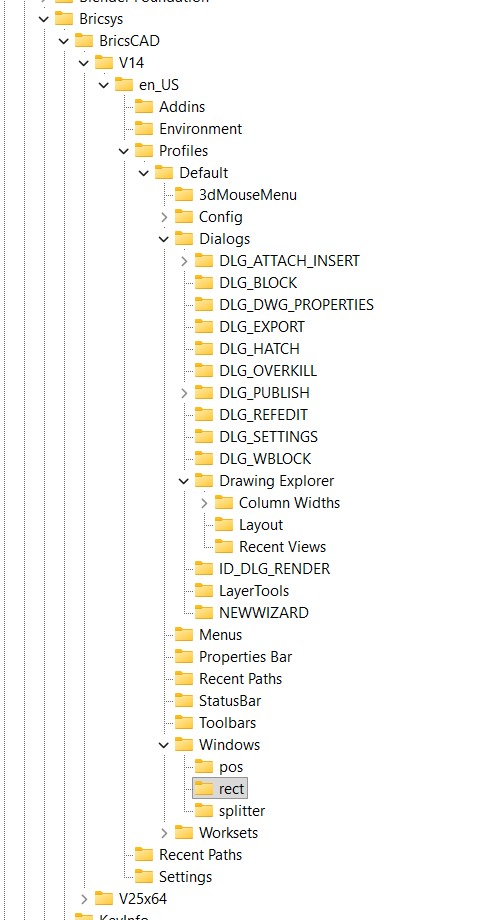
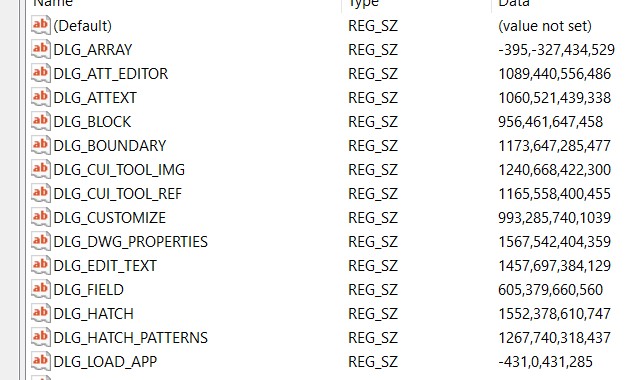
I am attempting to use the registry to do this. But, I really have very little knowledge about it. Just looking around I found this folder, and registry entry. (see attached images)
I see at the bottom of the list is "DGL_APP_LOAD" which am hoping is the correct one. The value is a set of numbers. I noticed that this was a negative value. Most of the other ones don't have a negative number. So perhaps that is the problem. I am also guessing that the numbers represent the location coordinates.
Of course, I am very cautious about playing around with the registry. So, can someone confirm that I am correct. And if so, what value should I change it to?
-Joe
Comments
-
Were you using multiple screens then went back to a single have seen this happen a pain to fix. Went back to prior user who had picked left screen and I had it set to right. Moved then saved dwg it was fixed. So something in dwg.
0 -
Some are these are stored in your profile, you can try creating a new profile
0 -
The syntax has changed in newer versions (probably due to the change to the QT toolbox), but from what I recall for older versions the four REG_SZ numbers are x position, y position, width, and height. I would change the first number to 431 instead of -431 and see if it fixes the problem.
0 -
I am curious if the profile is human readable. That may be a safer place to play around, rather than the registry.
-Joe
0 -
A profile is essentially a registry snippet containing just the details related to your profile settings. The file is in txt format making it reasonable easy to read and edit if you know what you're doing.
0 -
Thank you all for the effort to help me. Jason, I did brave editing the Registry before your message, and had success. My wayward APPLOAD window has returned home. When this first happened, the window to choose colors was also lost. Though, it spontaneously came home.
Wayward windows have been such a problem for a long time, I am surprised that Microsoft hasn't created a feature that automatically realizes that a window has gone off screen. Then, alert the user and offer to move it on screen… actually I am not surprised. Microsoft is too busy trying to force us to use their AI, and other marketing efforts, etc. to worry about such issues.
0 -
You may be surprised about Microsoft's alliance with Intellicad, do a google.
0 -
That's cryptic - doesn't produce a Google result - give us a clue?
0 -
-
Óh that - I imagined some new-tech plot. What's that to do with the OP?
0 -
I confess to adding the comment that started the off-topic direction. But, that is the nature of discussions, online or in person.
1 -
Sorry to go off topic " am surprised that Microsoft hasn't created" just that Microsoft got involved in CAD at one stage.
0 -
I am happy to see occasional random stuff inserted into a discussion. I found your post about Microsoft and Intellicad to be interesting. You might not have made a post about it on its own.
0 -
The window issue suddenly became a lot worse Wed and Thurs this week. I've been using the LISP utility BKG_FindToolbar.lsp. It will bring some windows (perhaps dialog box is the better term) where I can get them. But, they are placed centered on the upper left corner. I can't immediately get the header area to drag it where I can see all of it. But, if I grab the lower-right corner, to make it larger, and then release. The window will shift its location, and show the header of the window, so I can then drag that window so that I can see all of it.
But later in that same session, if I attempt to use the same command (Layer, Inert Block, etc) it will have forgotten where I put it.
Note that BKG_FindToolbar.lsp does not get all the dialog boxes onto screen each time. E.g., sometimes it won't bring the Layer dialog box onto screen. Exiting and then restarting BricsCAD will fix that particular problem, for a while.
Something this week has caused my dialog boxes to go crazy. … at least until today. Today they have calmed down for some reason or trigger, and seem to work normally.
0 -
Have you tried:
Win+ arrow keys
Or
ALT + SPACEBAR, M, then arrow keys0 -
Tried that without success. I only tried a few clicks of the keys, because I didn't know which way to move the window. I feared moving it too much the wrong way. Perhaps it is different from a regular Window, in that it is a dialog box that doesn't show on the task bar. So, maybe the standard Windows OS based method won't work?
But, the most important thing is the question of why this is an ongoing problem, and what triggered it?
-Joe
0 -
After getting the toolbars how you like, make sure you resave your workspace, this forces a remember. Where I worked the work spaces were like Andy, Alan, Mark.
0 -
Yesterday,I seems to have fixed the issue by turning off my external monitor on the laptop that I run BricsCAD on. It is 1920x1080 resolution. I opened and used BricsCAD, including resetting the windows. I brought several to center of the screen. And then quit BricsCAD. After resetting back to the external 2k monitor, BricsCAD seems to be working normally. Perhaps that process causes BricsCAD to do its own resetting of windows and dialog boxes to bring them back onscreen? Does anyone know if there is any such feature in BricsCAD?
I will mention another thing I noticed a few days ago, and played with, though it didn't help. My monitor scaling was set to 125%. I had done this years ago, to increase the size of the icons in BricsCAD. And when I set it to 100% didn't fix the issue.
0 -
None of my efforts really fixed the problem consistently. But, I think I found the trigger. I was commonly letting BricsCAD v14 stay open when I put my computer to sleep.
Also, a related trigger may be that I use a batch file with the licensing utility to first activate and then immediately deactivate BricsCAD, so that I don't loose my perpetual license permanently if my computer were to fail while BricsCAD was open. In my v14, BricsCAD will continue to run until you close it *. But, at least one feature, Publishing, doesn't work. And perhaps it affects BricsCAD's ability to save window positions.
If I exit BricsCAD before putting the computer to sleep, it doesn't trigger the lost-windows problem.
*Note that this method of protecting your perpetual license won't work with the current release of BricsCAD.
0 -
Do you still have a copy of Jason Bourhill's ResetWindow.lsp? It was in a reply to you in 2017 but is no longer in the forum. The problem was similar so it might work for this.
0 -
Yes, I have Bourhill's program. But, it often didn't work. Though, I can't say what circumstances it was when it wasn't working.
For future users browing this thread, below is the LISP code.
;------------------------------------------------------------------------------
; CAD Concepts
;; RESET WINDOW
;
; Copyright (C) 2016 CAD Concepts Limited.
;
; This program is free software: you can redistribute it and/or modify
; it under the terms of the GNU General Public License as published by
; the Free Software Foundation, either version 3 of the License, or
; (at your option) any later version.
;
; This program is distributed in the hope that it will be useful,
; but WITHOUT ANY WARRANTY; without even the implied warranty of
; MERCHANTABILITY or FITNESS FOR A PARTICULAR PURPOSE. See the
; GNU General Public License for more details.
;
; For a copy of the GNU General Public License, see
; .
;------------------------------------------------------------------------------
;
; File : ResetWindow.lsp
; Author : Jason Bourhill
; Web : http://www.cadconcepts.co.nz
; Date : 20/09/2016
; CAD Ver(s) : Bricscad V14 - V16
;
; PURPOSE:
; To reset the window locations of various BricsCAD dialogues
; Resets BricsCAD Window Locations by deleting the registry key where the
; window position is stored. There is an ALL option to reset all windows
; positions. This will also reset windows that aren't individually listed.; USAGE:
; To load type (load "ResetWindow.lsp") from the command line
; or drag and drop the file onto your drawing using explorer.
;
; Once loaded type RESETWINDOW to run.
;
;
; NOTES:
; - This application is intended for the WINDOWS version of BRICSCAD ONLY.
; - Do to specific key locations, it will only work on V14 and above.
; - This technique will not work on Toolbars. Toolbar positions are saved to the current Workspace.
; You can edit workspace settings by running CUSTOMIZE.
; - This application may stop working for future releases. Bricsys may move the location for storing window positions(defun C:ResetWindow ( / PrfKey ans KeyValue KeyValueList)
(princ
(strcat
"\nRESET WINDOW. Resets window postions that are opening off screen."
"\n*************************************************************************************"
"\nPrior to proceeding you may prefer to try moving the window back on screen first."
"\nTo do this run the command to open the window e.g. EXPLORER"
"\nPress Alt + Space + M, then use the arrow keys to move the window back on screen."
"\nPress Enter once you have finished."
"\n*************************************************************************************"
)
)
(cond
((and (= (getvar "PROGRAM") "BRICSCAD")(>= (atoi (substr (getvar '_vernum) 1 2)) 14)) ; If BricsCAD V14 or greater
;THEN proceed
; Build the current profile key location
(setq PrfKey (strcat "HKEY_CURRENT_USER\" (vlax-product-key) "\Profiles\" (getvar 'CPROFILE) "\Windows\rect"))
(initget 1 "All Battman bLock Customize Eattedit eDit eXplorer Field Open oVerkill Print pUblish Refedit Settings")
(setq ans (getkword "\nReset Window position of [All windows/Battman/bLock/Customize/Eattedit/eDit text/eXplorer/Field/Open file/oVerkill/Print/pUblish/Refedit/Settings]: "))
;Note there are a lot more window positions than these
(cond ; set specific value we want to change based on users response
((= ans "All")(setq KeyValue T))
((= ans "Battman")(setq KeyValue "DLG_BATTMAN"))
((= ans "bLock") (setq KeyValue "DLG_BLOCK"))
((= ans "Customize") (setq KeyValue "DLG_CUSTOMIZE"))
((= ans "Eattedit") (setq KeyValue "DLG_ATT_EDITOR"))
((= ans "eDit")(setq KeyValue "DLG_EDIT_TEXT"))
((= ans "eXplorer") (setq KeyValue "Drawing Explorer"))
((= ans "Field") (setq KeyValue "DLG_FIELD"))
((= ans "Open")(setq KeyValue "DLG_OPENFILE" ))
((= ans "oVerkill")(setq KeyValue "DLG_OVERKILL" ))
((= ans "Print")(setq KeyValue "DLG_PRINT" ))
((= ans "pUblish")(setq KeyValue "DLG_PUBLISH" ))
((= ans "Refedit")(setq KeyValue "DLG_REFEDIT" ))
((= ans "Settings")(setq KeyValue "DLG_SETTINGS" ))
)
(cond
((= ans "All")
(initget "Yes No") ; set keyword(s) for getkword
(cond
((= "Yes" (getkword (strcat "\nAbout to reset " (strcase ans) " window positions. Do you want to proceed? [Yes/No] <N>: "))) ; prompt user with choice
;if Yes THEN reset All the registry key values
(setq KeyValueList (vl-registry-descendents PrfKey T)); collect all key values
(foreach KeyValue KeyValueList
(vl-registry-delete PrfKey KeyValue) ; Delete the registry key, will be recreated next time the window is opened
(princ (strcat "\nReset key: " PrfKey " : " KeyValue))
)
)
; ELSE confirm to the user that nothing has been done
(T (princ "\nNo Changes Made"))
); end cond
)
(T ; for all other options
(initget "Yes No") ; set keyword(s) for getkword
(cond
((= "Yes" (getkword (strcat "\nAbout to reset " (strcase ans) " window position. Do you want to proceed? [Yes/No] <N>: "))) ; prompt user with choice
;if Yes THEN reset the registry key value
(vl-registry-delete PrfKey KeyValue) ; Delete the registry key, forces a reset next time Drawing Explorer runs
;(vl-registry-write PrfKey KeyValue "") ; Alternatively you could set to something else.
(princ (strcat "\nReset key: " PrfKey " : " KeyValue))
)
; ELSE confirm to the user that nothing has been done
(T (princ "\nNo Changes Made"))
); end cond
)
)
)
; ELSE inform the user that they are not using BricsCAD
(T (princ "\nThis utility is BricsCAD only. visit http://www.bricscad.com for more details"))
); end cond
(prin1)
)(prompt "\nReset Window Loaded, To run Type: RESETWINDOWW")
(prin1)0 -
DLG_APP_LOAD is not in the list of dialogs in ResetWindow.lsp but it could be added.
Per the header the function resets BricsCAD Window Locations by deleting the registry key where the window position is stored. For just one dialog it is probably easier to use Regedit to either edit the X and Y values (first two of the numbers in the key) or delete the key. This needs to be done before running Bricscad.
0