BimInsert > BmInsert > Insert?

How do I insert additional instances of BIM Components to match those already inserted in the model without having to go back to the Library panel or to browse again through a file dialog, and without the tedium of adjusting parameters every time?
BmInsert used to let me select an existing component block to inherit its parameter values. It wastes time and risks errors even on simple components to readjust just a few parameters, let alone on complex components with dozens. This is all even worse when the properties panel fails to change parameters and rollover cannot change parameters for more than one component at a time!
v26 warns: "The BMINSERT command is being phased out and will not be available in BricsCAD® V27." It still gives me the choice to "continue anyway" with some components and does not work at all with others—which ones and why, I don't know.
Previously, BIMINSERT [two "i"s] got deprecated, subsumed by BMINSERT [one "i"].
I welcome simplification as long as I don't lose functionality.
Comments
-
Hello.
Concerning BIM components
An approach could be to edit the default component, the one defined in the library.
Then, you could set the parameters as desired.
Finally, this component could be saved as a new component in the libray, using a name different than the original.Concerning the commands
BMINSERT was introduced a while ago specifically to work with mechanical components.
In the future, mechanical components will no longer be available and mechanical blocks will be used instead.
Mechanical blocks are regular blocks that hold a mechanical structure.
Being regular blocks, the INSERT command will be used to insert them.With BIMINSERT, the case is similar.
So, to insert blocks, mechanical or BIM, only the INSERT command will be available in future versions.
2 -
You can't be serious, Virgil. The approach you suggest not only ignores the first part of my question, it defeats the whole purpose of parametric design!
Look, here are 230 standard sizes across only two parameters, Width x Height, for just one window type from one leading vendor.
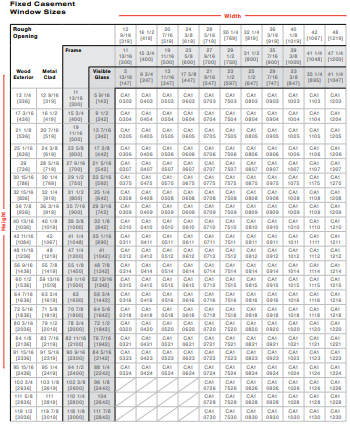
Forget multiplying that by number of manufacturers, window series and subtypes, frame and glazing options, wall thicknesses, trim details, custom sizes, etc. It already takes too long to sift through the pre-defined library, and to make it worse BricsCAD fails to generate thumbnails properly and refuses to hold your place in the stacks when you return (hello, anybody to work on SR 134495 from 4 years ago??).
Why abandon a perfectly useful function like BIMINSERT? If they are making the whole object class of BIM components obsolete in favor of new and improved mechanical blocks, then they should offer at least equivalent if not more advantages.
2 -
Hello.
I might have not understood the question.
I apologize if this is the case.The question was about inserting blocks that match the existing ones.
This can be interpreted as inserting blocks that already hold specific parameter values, and not the default ones.The purpose would be to avoid setting the configuration after insertion, and saving time.
If this is the case, saving a new block in the library, that holds a specific default configuration, is a solution that could be considered.
Alternatively, a design table could be created in the new block.
This could allow to select a configuration and set multiple parameter values in one step.If the task is to completely avoid using the Library panel, then a solution could be to use a tool palette.
This palette could be specifically adjusted to include the blocks that are needed for a particular project.0 -
"If they are making the whole object class of BIM components obsolete in favor of new and improved mechanical blocks …"
Didn't Virgil say that both BIM Components and Mechanical Blocks alike are now becoming regular Blocks, so inserted by the regular INSERT tool?0 -
I must not have made my workflow clear.
Previously, I could BimInsert or BmInsert a component, let's say the simple pre-defined Window 1x1, possibly resize its width and height using the hotkey assistant toggle and position it on a wall. Then I'd reselect (because there's still no native selection lock) the component instance and adjust its other parameters, e.g., Rebate, PlacementDepth, LiningThickness, etc. Later I want to insert one or more of the same components, with mostly the same parameter values except maybe varying one or two, out of nine parameters in this example. With BimInsert, all I'd have to do is first select the component instance that is already in model space, then it automatically applies all those parameter values to the new instance, while still giving me the hotkey assistant to make adjustments on the fly. This saves a ton of time when you have many parametric variations.
With Insert, as far as I've tried, it does not care what block you have pre-selected in model space, let alone apply the same parameters, it reverts instead to whichever block was last inserted.
If components are now just regular blocks, then perhaps the intended new workflow is simply to copy instead of to insert new instances. Notably however, Virgil, you had advised me in response to SR 153110 to avoid copying doors and windows because of a bug that prevented the component copies from moving independently. Maybe that bug got fixed, or maybe was an impetus for shifting away from components?
Whether copy or insert or some other custom lisp command is the way forward, I will miss the BimInsert hotkey assistant. Even more, I'll miss the ability to batch change parameters for multiple
componentsblocks, as the properties panel used to do.0 -
As a BricsCAD Mechanical user I'm not happy either about this development.
I would have to look at the BIM interface but if it is similar to the Mechanical interface then there should be a insert BIM (or Mechanical in my case) block button in one of the ribbons. This button works very similar to BMINSERT without having to go through the INSERT dialog mess.
0 -
If you run the insert command from the quad menu on an already inserted block in the model the parameters of the said block are used as the default in the newly inserted copy unless changes are made with the hotkey assistant from my experience
1 -
Thank you, RSW. I will look and give that a try. (As of v26 I'd turned off the ribbon as several tabs came empty, reverting to toolbars and my old preference for keyboard shortcuts.)
Thank you, Jtlive. That's very helpful! The quad Insert button appears to call the command line version _-Insert with pre-programmed script to skip the X Scale, Y Scale, and Rotation prompts. Now I see that -Insert has a new prompt option "& to insert preselected block". If documented somewhere, I missed it. The "&" gets me close to the solution I was wishing for!
Strangely, hotkey assistant fails to appear for any flavor of Insert now, although it still works for other commands such as Drag or Select.
Still need batch parameter adjustment. I've tried BimAutoMatch, by the way, and never got it to do anything with components or blocks.
0
