Standard CTB for Sectionsettings

Hallo
I have been setting up our internal standards for BIM and I have not found a standard .ctb file that is a match for the layer colors found in _sectionsettings.dwg.
I Am told its not proovided and we have to create one. Can you pls confrim ?
If so Is there a system / logic with which the layers colors have been assigned in this file ? or is it random and users must create a ctb ?
Im asking because is more than 300 layers and I do not want to cause any damage in case I want to modify them.
Thanks in advance
Luca
Comments
-
You can edit a ctb file so what happens when you use default.ctb ? In a ctb you can have color is red but plot blue and so on. Same with viewports in a layout can override the Model space color.
0 -
Thanks for the answer
I understand the ctb logic. I was just wondering if the colors in the _sectionsettings.dwg were matching a default ctb file which I was missing. No problem - I will create our own.
Thanks again for your answer
Luca
0 -
Is it that you want the non-256-standard _sectionsettings.dwg colours to print black, or some specific colour(s), rather than their 'native' colour?
0 -
Like Tom our default ctb had 1-9 as black/grey 10-250 as color 250+ as grey. We matched the iso drafting pens for thickness yep that old.
0 -
I have 1-249 print as black, 250-255 print as Use Current i.e. grey shades, all other 16 million or whatever RGB colours print as own-colour. Layers determine colour and lineweight, thus
Con-Joinery has colour 48 (dark brown), lineweight Default, prints black
Con-Joinery Brn has RGB colour 153,114,77, lineweight default, prints mid brown
Con-Joinery25-Mar has RGB colour 153,41,76, lineweight 0.25, prints maroon
Con-Joinery50-Mar has RGB colour 153,41,76, lineweight 0.50, prints maroon
So mostly, on screen, I can tell from display colour what use-class, what lineweight and what print colour.
Is something like that, why chowluca wants a ctb table that specifies the colors of the layers found in _sectionsettings.dwg ? Otherwise, what, why?0 -
Dear Tom
Dear AlanhThank you so much for your input and sharing your indications.
I have used ctb only in the contxt of 2D drafting but in this case I am dealing with generated sections and I am getting used to managing all these additional information.Our main issue are:
- when we design interiors we receive 3D DWG (building envelope) from other designers and therefore it carries their OWN layers, resulting in a huge list of additional layers / settings.ù
- Secondly we may have different thinckess for section / cut boundary layers for different elements: for examples Boundary_Structure needs to be thicker than vs Boundary_Joinery which can be narrower.
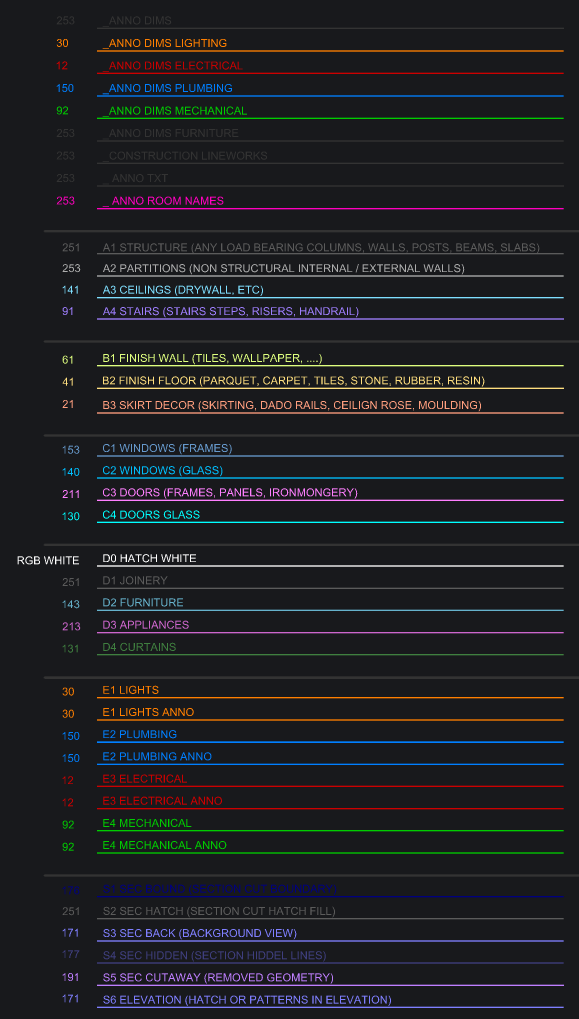
Anyway I will be experimenting.
Thank you both again for your input.
Luca
0 -
So yes you are trying to specify both lineweight and print-colour, layer by layer, for not just "the layers found in _sectionsettings.dwg" but also the layers found in imported 3D-model drawings? Do any of these layers already have RGB colours i.e. colours outside of the standard 256-colour range? If so, I don't think a ctb table is capable of specifying how those colours should print?
0 -
Could/should this be handled by "Typed Plans" Settings ?
0


