Problem with Appload and On_doc_load

I have a lisp routine that will not load via the on_doc_load file. If I use appload, the routine will load, but even though I tick "Autoload" and "Load" both are unticked when I restart Briscad. I can load the routine using the full path from the command line. The support path is correct in the settings and the lisp are in the support folder. Any ideas anyone?
Comments
-
I can appreciate that you may not want to share your lisp code, so could you do a screenshot of your entry in on_doc_load.lsp, to see if that gives any initial clues?
0 -
David I have no objection, here it is:(vl-load-com)
(defun c:AT5 (/ layName txtStyle userText insPt)
(setq layName "1-DG_TEXT_5.0")
(if (not (tblsearch "layer" layName))
(entmake
(list (cons 0 "LAYER")
(cons 2 layName)
(cons 62 3)
(cons 6 "Continuous"))))
(setvar "clayer" layName)(setq txtStyle "Arial Annotative_5.0")
(setvar "textstyle" txtStyle)(setq userText (getstring T "\nEnter text: "))
(setq insPt (getpoint "\nPick insertion point: "))(command "_MTEXT" insPt "W" 0 userText "")
(princ)
)(defun c:AT25 (/ layName txtStyle userText insPt)
(setq layName "1-DG_TEXT_2.5")
(if (not (tblsearch "layer" layName))
(entmake
(list (cons 0 "LAYER")
(cons 2 layName)
(cons 62 2)
(cons 6 "Continuous"))))
(setvar "clayer" layName)(setq txtStyle "Arial Annotative_2.5")
(setvar "textstyle" txtStyle)(setq userText (getstring T "\nEnter text: "))
(setq insPt (getpoint "\nPick insertion point: "))(command "_MTEXT" insPt "W" 0 userText "")
(princ)
)(princ "\nType AT5 or AT25 to insert annotative text.")
It's a pretty simple routine, just for adding a piece of text under details/Sections etc
0 -
Hi Keef,
This is the error I was getting when I tried to just drop your lisp into my drawing.
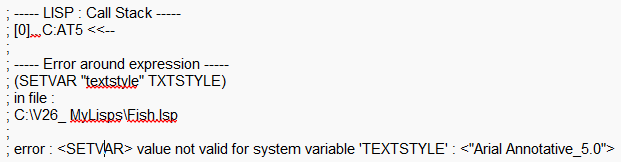
i didn't have your textstyles in my drawing, so added the style and the routine worked.
I tried APPLOAD, restarted Bricscad and it was still ticked when I started it again.
I deleted it from APPLOAD and changed the text style to Standard in your lisp, which is in my template file and added it to my on_doc_load.lsp and it also worked no problem.
Hope that helps?
0 -
Hi David
I should have mentioned about the text style :-) I'll try what you have suggested, it really is annoying as I have a lot of other lisps that load fine by either appload or on_doc_load. I'll let you know
0 -
Using the Appload Start up suite, you do not have to have multiple single lisps loaded, you can load one big one with all your custom lisps in it. My Custom.lps has some 38 defuns in it plus lots of "Autoload", If you don't know about Autoload it allows you to type in a command name which demand loads the lisp then and runs it etc so its not preloaded and not being used.
(autoload "COPY0" '("COPY0"))
(autoload "COPYCOMMAND" '("ZZZ"))
(autoload "COVER" '("COVER"))
(autoload "DIMFLIP" '("DIMFLIP"))0 -
God One AlanH. And a note to David. I actually found the issue. It was an errant reference the V24 in the support file path. So it was obviously reading that first, couldnt see it and skipped the correct one. As soon as I removed that, it worked fine.
0 -
In reading support path when you have multiple paths make sure top priority one is the 1st entry, in the other CAD once a program etc is found it stops looking in the other support paths.
0
