NumPad menu not working

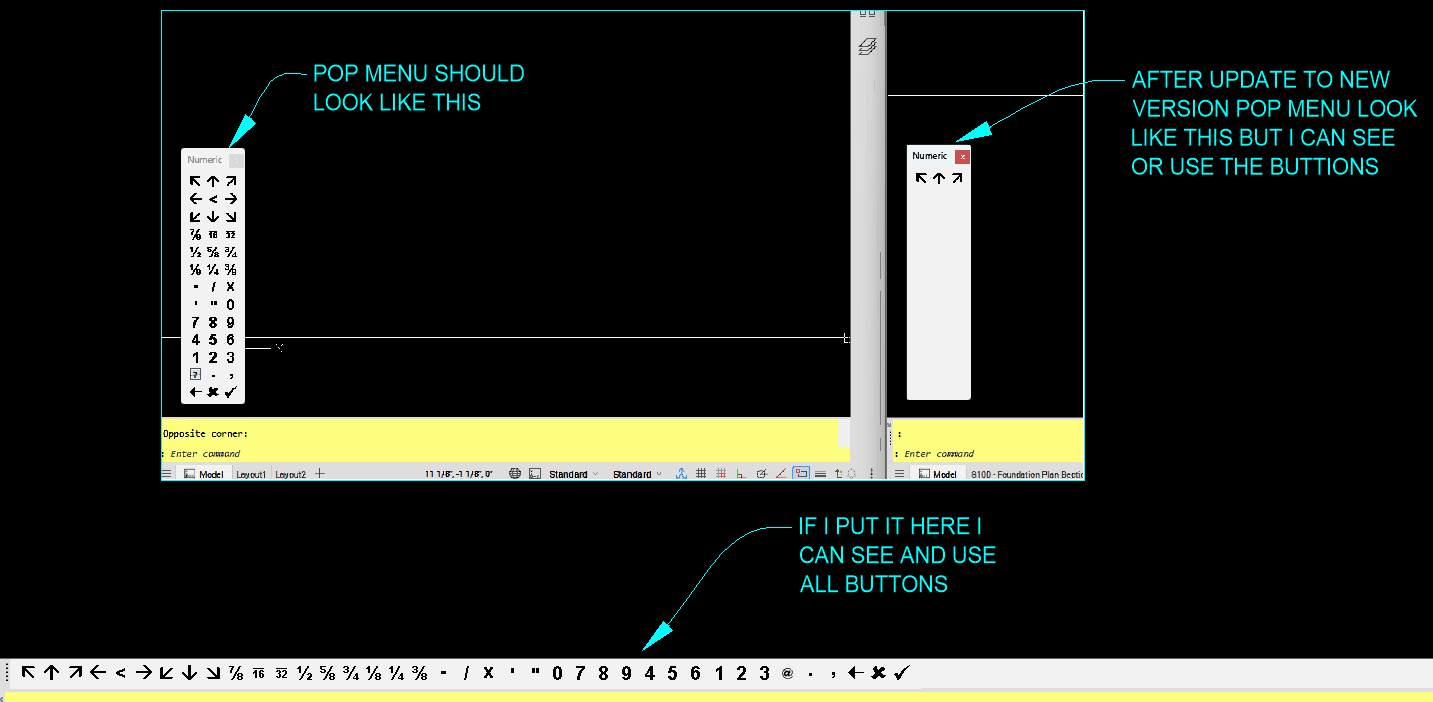
For years i've used a Numpad menu to draw lines, move items etc. saves time typing. I installed the new Version of Briscad 26.2.03 now that menu does not load correctly. Anyone have suggestion for a fix.
I'll attach the NumPad menu if help for testing. I know its and old menu but i find it useful. Thanks
Comments
-
I had similar problem (some icons disappeared). In my case modification of command identification (ID_*), so that they were unique through all possible menus, helped.
0 -
Until this bug is fixed, you might try closing and re-showing the toolbar. I believe that can get it displaying correctly for the current session.
0 -
Thanks Jbn1, not sure modification of command identification is something i'm familiar enough to do. I'll have to research it more.
Thanks Owen, i've unloaded the menu and open closed it multiple times and even reloaded it from a different dir but still can only see buttons when stretched out.
0 -
I expect this to be fixed in a maintenance release, but I recommend submitting a support request to make sure your voice is heard and you get notified when the fix is shipped.
0 -
I tried to modify your mnu file, unfortunately without success. I think Owen suggestion concerning support request is good idea.
0 -
Thanks, i had to go back to previous version because of Dynamic block errors i was having, so hope next version i try it will work.
0