Is it possible to remove the crosshair from the pickbox?

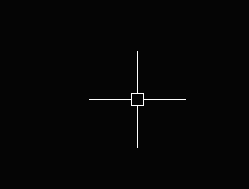
probably just my OCD, but is it possible to make the crosshairs stop at the pickbox instead of intersecting it?
Comments
-
Hello.
You could experiment with setting the crosshair size to minimun, which is CURSORSIZE=1.
The size of pickbox can then be adjusted to fit this minimum size.
PICKBOX=9 could be useful.0 -
Hello,
I am attaching a photo for reference, essentially, I want my crosshair size to be around 50, but i want it to stop drawing the crosshair once it reaches the pickbox.
Setting to 1 just makes my have no crosshair unfortunately.
 0
0 -
So what you actually want is a gap between the crosshair lines and the pickbox?
I don't think this is possible through settings. You may want to file a feature request for this.
0 -
Hello.
Thank you for the feedback - I misunderstood the original question.
It is not possible to interrupt the crosshairs of the cursor, they are drawn continually from one end to the other.
This behavior is built-in and can't be changed.
The crosshairs intersect with the pickbox only visually, there is no internal mechanism to find that intersection and remove what is inside the pickbox, like when working with 2D entities.
The only settings available for the cursor are the size and the colors of the crosshairs.
0