WxWidgets and BRX.

I updated my sample github.com/CEXT-Dan/WxArx
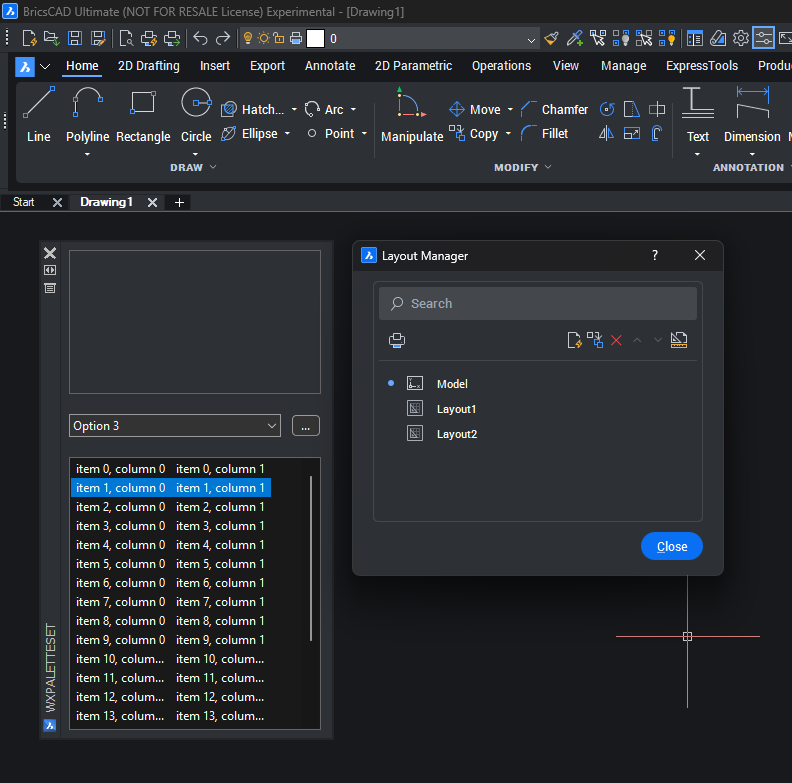
There’s a new class wxDarkModeSettings where you can specify some of colors so you can exactly match BricsCAD’s colors. there’s a sample wxApp entry and Palette
Comments
-
Ok so, can we change the colour of say the text in Selected file tab, layout tab, selected tool palette tab, to blue?
So it makes it easier to see what is actually selected, cos pretty difficult to determine selected tab when the colour of text is the same but they made the text a little thicker weight but barely noticeable.
0 -
Layout Manager dialogue you show, see the search field? Can the background colour be changed? eg darker, 30,30,30 RGB or thereabouts? The text colour is about 200 200 200 or lower by the background is like 100 100 100 RGB. Hard to read.
0 -
The wxArx part is only the palette, the Layout Manager is stock, except the title bar and icon. The goal was to illustrate how to make GUIs close to BricsCAD native. The palette background is set to RGB(45, 49, 53); which seems to be close to what Bricsys uses.
Hint text is meant to have some transparent effect
0
