Insert the viewport label

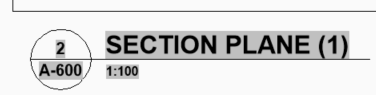
Hello, While creating layouts, I can no longer automatically insert the viewport label block with the corresponding viewport name beside each viewport. Does anyone know how to get this working again in BricsCAD BIM?
Comments
-
Hello.
The view label is a setting specific to the sheet set assigned to a project.
To access this setting, activate the Sheet Set Manager panel.
Then, open the sheet set if it is not already open.
Click on the sheet set name and expand the Details pane at the bottom.
The field named View label block can be used to set the the view label to be used.The view label should be automatically inserted.
It might help to check whether the block set to be used as view label exists in the drawing set as source.
If a view label is missing from a certain view, then right-click on the view name in Sheet Set Manager and choose Place View Label Block.
Then, follow the command prompt.0 -
Thank you very much for your reply. It worked on the first try!
0