Parametric block with grip

Comments
-
There is no such a possibility in BricsCAD at the moment. Improvement of parametric blocks is an ongoing process, we have a feature request task about parameters edit too.1
-
In the Bricsys Help Center under "2D parametric blocks" there ist a section "Grip editing a parametric block". Here it is described how to do exactly that. However, it does not work with me. That's why I assume that it still doesn't work, right?
1 -
In BricsCAD v25 it works.
It is/will be greatly enhanced in BricsCAD v26 but I cant test it as I don't have that yet.
0 -
I'm using Microvellum BSB (bricscad V25) and when I create the parametric block with visible states. everything functions, but the overall feel is a little wacky, First you still see the grips of the hidden states, so if you have multiple functions build in, you see more than you really want. the other issue is to change the state you have to do it the properties window, it doesn't have a grip for the visibility states, at least that I have seen or figured out. I have some pretty advanced dynamic blocks that came over working fine, and some less complicated ones that didn't work.
Anyone know how to get the grips of the hidden states to hide with the hidden state it's on? you can see the 3 that I circled that belong to a hidden state.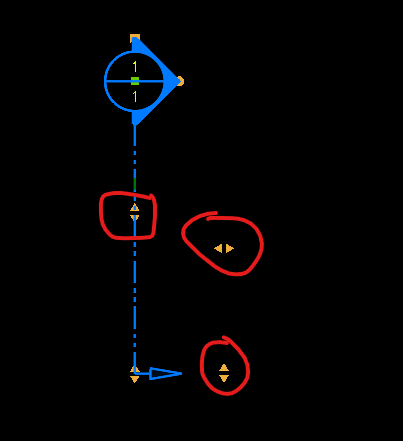 0
0 -
Just a side comment have a pick dynamic block and a dcl is made displaying visibility state names then choose happy to provide.
0