V25 Text Font[Arial] Not Working

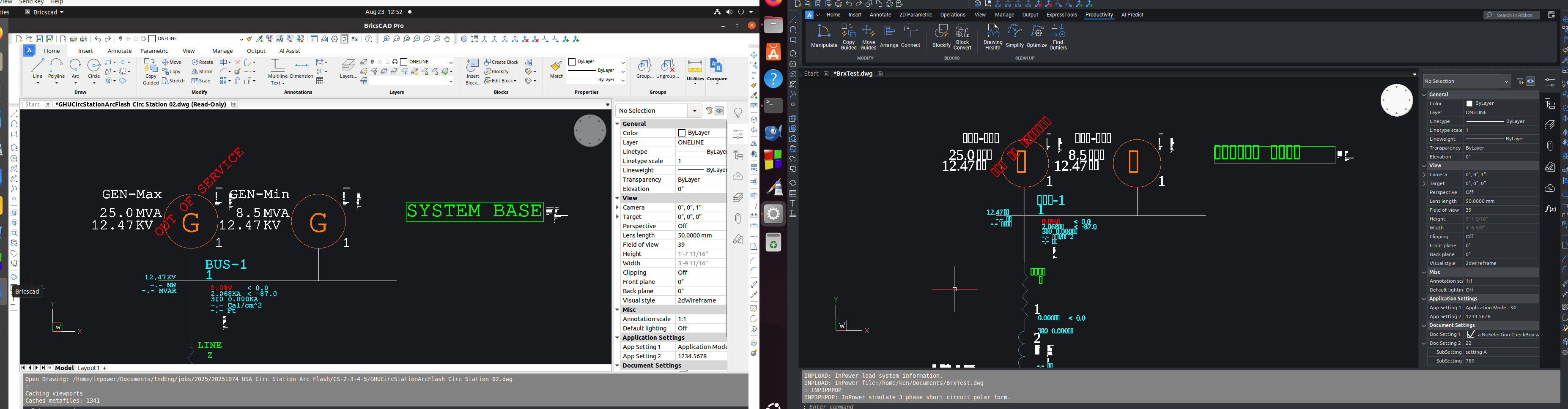
Ubuntu V24 BricsCAD V25 Trial. I opened up one of my files and the text is showing up as 00000. The numbers appear to be working but not the letters.
Must be some font problem? I changed the font to romanc.shx and the text display is correct.
Font [Arial] is not working for letter characters.
This image shows the same file with V23 vs. V25.
Comments
-
Fixed the problem like this, unfortunately this is specific to only one drawing.
How to fix the default [Arial] font?
- Type
STYLEin the command bar and press Enter to open the Text Style Explorer dialog box.
- Locate the
Standardstyle (or create a new one) and change its Font property to your desired font.
- Click OK to save the changes to the Text Style.
0 - Type
-
copied this folder from V23 to V25, fixed the problem
/usr/share/fonts/truetype/freefont
1 -
Noticed the same thing.
However I don't have the V23 /usr/share/fonts/truetype/freefont available. Cnut, could you please upload it here or has this font bug been fixed in recent updates?
0 -
try this
0 -
Thank you Cnut!
It helped me to read the text on the drawings, but the Freemono.ttf font was used instead of Arial.ttf and appears slightly larger. With your instructions I now have a better understanding of where the fonts are stored, and I looked into this further. I believe that user-added fonts should be placed in /usr/local/share/fonts/freefont so they are not mistaken for system fonts located in /usr/share/fonts. Please correct me if this is wrong, but it worked in either directory.I also discovered that the root cause of Arial not being found was that I had forgotten to accept the license terms for the Microsoft fonts when installing the mscorefonts package. There was no fonts in library /usr/share/fonts/truetype/msttcorefonts, so I made a reinstall, accepted the EULA, and the MS fonts showed up. Now the drawings display correctly with Arial, Times New Roman etc.
The Liberation Sans font (/usr/share/fonts/truetype/liberation/LiberationSans-Regular.ttf) is for example very similar to Arial and can serve as a substitute if you prefer to use only free fonts that are perhaps already installed by default. There are also other free fonts that can be used as substitution.
I assume that it should be possible to create a font substitution file so that this font is selected automatically if for example Arial.ttf is missing. There may be information about this in the following help section:
This of course requires that Windows has Liberation Sans installed, which I happened to have in my Windows installation. However, I am not sure when or with which application it was installed, since Liberation Sans does not appear to be shipped with Windows 11 according to the list here:0
