Resetting Appload wayward window

My appload dialog box has wondered off screen. The lisp routines that can reset these things can't be loaded because of that. So, I need to find another way.
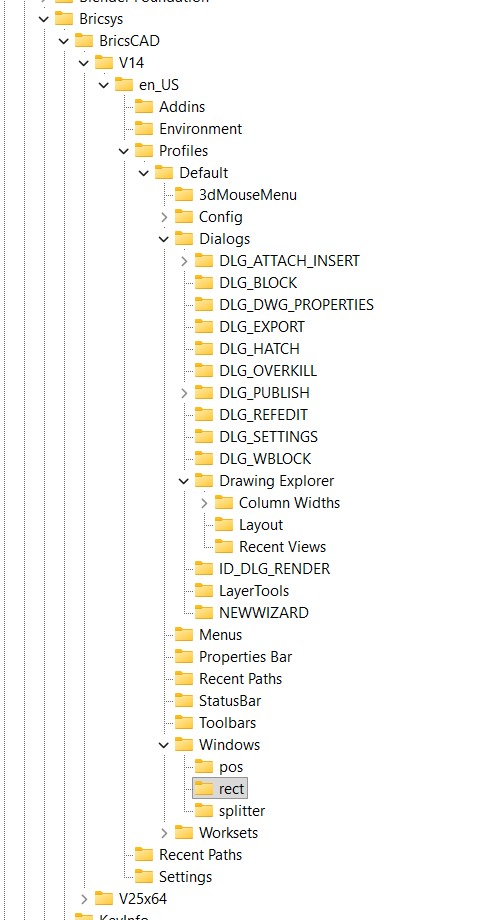
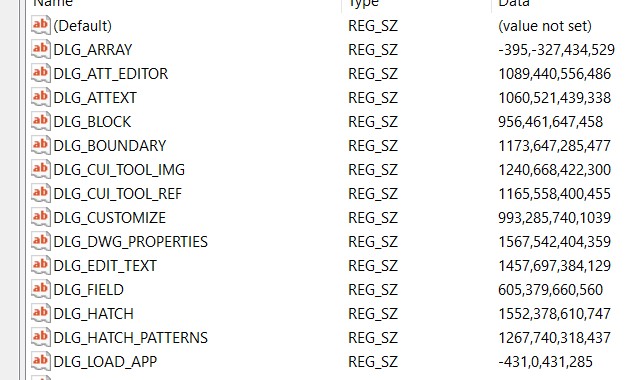
I am attempting to use the registry to do this. But, I really have very little knowledge about it. Just looking around I found this folder, and registry entry. (see attached images)
I see at the bottom of the list is "DGL_APP_LOAD" which am hoping is the correct one. The value is a set of numbers. I noticed that this was a negative value. Most of the other ones don't have a negative number. So perhaps that is the problem. I am also guessing that the numbers represent the location coordinates.
Of course, I am very cautious about playing around with the registry. So, can someone confirm that I am correct. And if so, what value should I change it to?
-Joe
Comments
-
Were you using multiple screens then went back to a single have seen this happen a pain to fix. Went back to prior user who had picked left screen and I had it set to right. Moved then saved dwg it was fixed. So something in dwg.
0 -
Some are these are stored in your profile, you can try creating a new profile
0 -
The syntax has changed in newer versions (probably due to the change to the QT toolbox), but from what I recall for older versions the four REG_SZ numbers are x position, y position, width, and height. I would change the first number to 431 instead of -431 and see if it fixes the problem.
0 -
I am curious if the profile is human readable. That may be a safer place to play around, rather than the registry.
-Joe
0 -
A profile is essentially a registry snippet containing just the details related to your profile settings. The file is in txt format making it reasonable easy to read and edit if you know what you're doing.
0 -
Thank you all for the effort to help me. Jason, I did brave editing the Registry before your message, and had success. My wayward APPLOAD window has returned home. When this first happened, the window to choose colors was also lost. Though, it spontaneously came home.
Wayward windows have been such a problem for a long time, I am surprised that Microsoft hasn't created a feature that automatically realizes that a window has gone off screen. Then, alert the user and offer to move it on screen… actually I am not surprised. Microsoft is too busy trying to force us to use their AI, and other marketing efforts, etc. to worry about such issues.
0 -
You may be surprised about Microsoft's alliance with Intellicad, do a google.
0 -
That's cryptic - doesn't produce a Google result - give us a clue?
0 -
-
Óh that - I imagined some new-tech plot. What's that to do with the OP?
0 -
I confess to adding the comment that started the off-topic direction. But, that is the nature of discussions, online or in person.
1 -
Sorry to go off topic " am surprised that Microsoft hasn't created" just that Microsoft got involved in CAD at one stage.
0 -
I am happy to see occasional random stuff inserted into a discussion. I found your post about Microsoft and Intellicad to be interesting. You might not have made a post about it on its own.
0 -
The window issue suddenly became a lot worse Wed and Thurs this week. I've been using the LISP utility BKG_FindToolbar.lsp. It will bring some windows (perhaps dialog box is the better term) where I can get them. But, they are placed centered on the upper left corner. I can't immediately get the header area to drag it where I can see all of it. But, if I grab the lower-right corner, to make it larger, and then release. The window will shift its location, and show the header of the window, so I can then drag that window so that I can see all of it.
But later in that same session, if I attempt to use the same command (Layer, Inert Block, etc) it will have forgotten where I put it.
Note that BKG_FindToolbar.lsp does not get all the dialog boxes onto screen each time. E.g., sometimes it won't bring the Layer dialog box onto screen. Exiting and then restarting BricsCAD will fix that particular problem, for a while.
Something this week has caused my dialog boxes to go crazy. … at least until today. Today they have calmed down for some reason or trigger, and seem to work normally.
0 -
Have you tried:
Win+ arrow keys
Or
ALT + SPACEBAR, M, then arrow keys0 -
Tried that without success. I only tried a few clicks of the keys, because I didn't know which way to move the window. I feared moving it too much the wrong way. Perhaps it is different from a regular Window, in that it is a dialog box that doesn't show on the task bar. So, maybe the standard Windows OS based method won't work?
But, the most important thing is the question of why this is an ongoing problem, and what triggered it?
-Joe
0 -
After getting the toolbars how you like, make sure you resave your workspace, this forces a remember. Where I worked the work spaces were like Andy, Alan, Mark.
0 -
Yesterday,I seems to have fixed the issue by turning off my external monitor on the laptop that I run BricsCAD on. It is 1920x1080 resolution. I opened and used BricsCAD, including resetting the windows. I brought several to center of the screen. And then quit BricsCAD. After resetting back to the external 2k monitor, BricsCAD seems to be working normally. Perhaps that process causes BricsCAD to do its own resetting of windows and dialog boxes to bring them back onscreen? Does anyone know if there is any such feature in BricsCAD?
I will mention another thing I noticed a few days ago, and played with, though it didn't help. My monitor scaling was set to 125%. I had done this years ago, to increase the size of the icons in BricsCAD. And when I set it to 100% didn't fix the issue.
0