dimensions doesn't "obey" print style

BricsCAD v26.1.08(x64) on Windows 11
Hello,
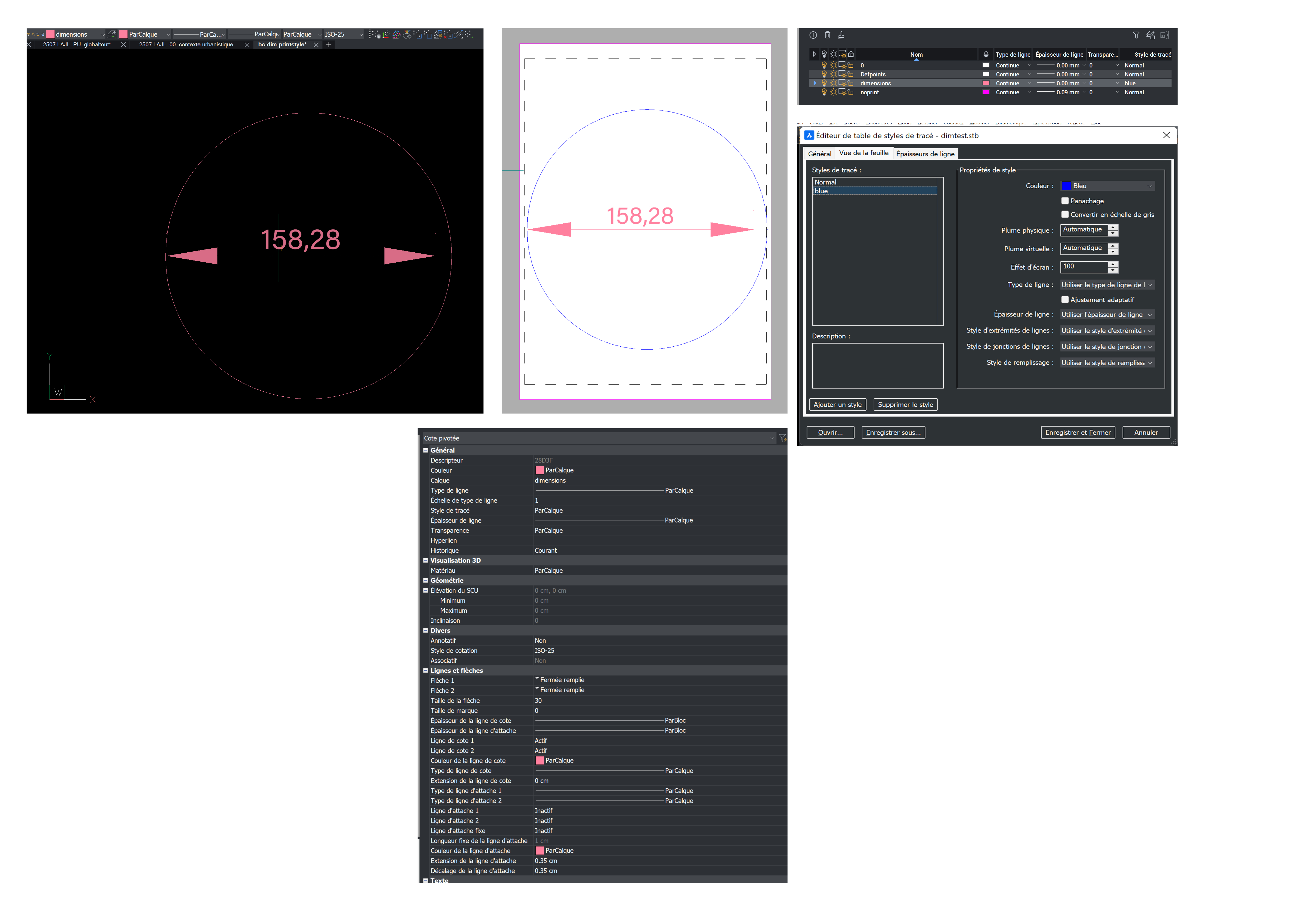
I made a sample drawing. There's a circle and a dimension.
- the drawing uses STB
- both circle and dimension are in "dimensions" layer, which has its print style set to "blue"
- print style "blue" is defined in "dimtest.stb", which is used on the test layout
- both circle and dimension have "bylayer" print style
- the dimension's properties uses "bylayer" for everything related to color
- PROBLEM : the circle "obeys" the bylayer-printstyle chain, the dimension doesn't (both in preview and PDF print)
this doesn't always happens. I should add that the problem originated from a file created on a Mac version (though it "survives" when I open it on my Windows version).
Is there a solution or a workaround ? Or should I report it as a bug ?
Attached : sample dwg, sample stb, and context screenshots.
NOTE : your forum upload system doesn't allow .stb extensions, I had to zip it !
Comments
-
Using AutoCAD and other DWG-based CAD software for more than 25 years, I’ve only ever had to use named plot styles once, in an isolated project, and that was 10 years ago.
So you probably know more about named plot styles than I do.However, a few things about your issue confuse me:
- In your screenshot, your dimension style is set to “ByLayer” (ParCalque) for the color of text and lines. In the DWG file you uploaded, however, the color for text and lines within the dimension style is set to “ByBlock.”
My best guess is that there is a discrepancy between the file you used when taking the screenshot and the file you uploaded. - The STB file you uploaded is named “dimtest.stb” and contains a plot style named “blue” (besides the ubiquitous plot style “Normal”).
Neither of the plot styles “blue” nor “dimtest” seems to be used in the provided DWG file.
My suggested course of action would be to sort out the above-mentioned discrepancies, unless you’ve already resolved the issue.
0 - In your screenshot, your dimension style is set to “ByLayer” (ParCalque) for the color of text and lines. In the DWG file you uploaded, however, the color for text and lines within the dimension style is set to “ByBlock.”
-
Thanks for looking.
My bad ! I had not saved the sample dwg before uploading here. I corrected my initial post, and joining it here too.
FWIW : I've used OtherCAD with CTB from 1998 to 2000 (with a pen plotter), with STB from 2001 to 2019, BricsCAD since.0