Client struggles with import

I have had a couple of clients say they struggle to import my data into there software. They mention vports. Its to do with me using paper space to present my drawings but the model data is still there exactly the same. I have now had this from clients using both Revit and vectorworks now saying they have struggled to import. I guess it's an import problem rather than a bricscad problem but perhaps I'm wrong
Never had a problem before I used paperspace.
Comments
-
So your master dwg is in Model ? The you have layouts with viewports that do just that show a view of the Model space. Should be ok> Or are you drawing in paper space as well ?
1 -
Hey A, thanks for the reply.
Yes the drawing is in model space but I have title block and legend in paperspace where I have viewports to the model space. They are using vectorworks.
I have just returned to using layouts and they didn't have a problem before that.
0 -
Sounds ok, I can not help any more no access to other CAD programs. You may want to get more information from them other than "we have a problem".
0 -
Hi Alan,
No problem and thank you
They said it came in with vports and as a block and they couldn't manipulate the data. It was vectorworks
0 -
drawing is in model space but I have title block and legend in paperspace where I have viewports to the model space.
That sounds totally right.
it came in with vports and as a block
Usually it would import the Model from Paperspace to VW Design Layer ⇒ editable
(If you do not put your whole Model in a Block, there should not come a VW Symbol in, but if there was they could "Convert to Group" and "Ungroup" ⇒ ACAD Explode - editable)I see VW has a DWG Import Option to put everything in a Symbol. For whatever reason. I see it for the first time. Maybe they activated it ?
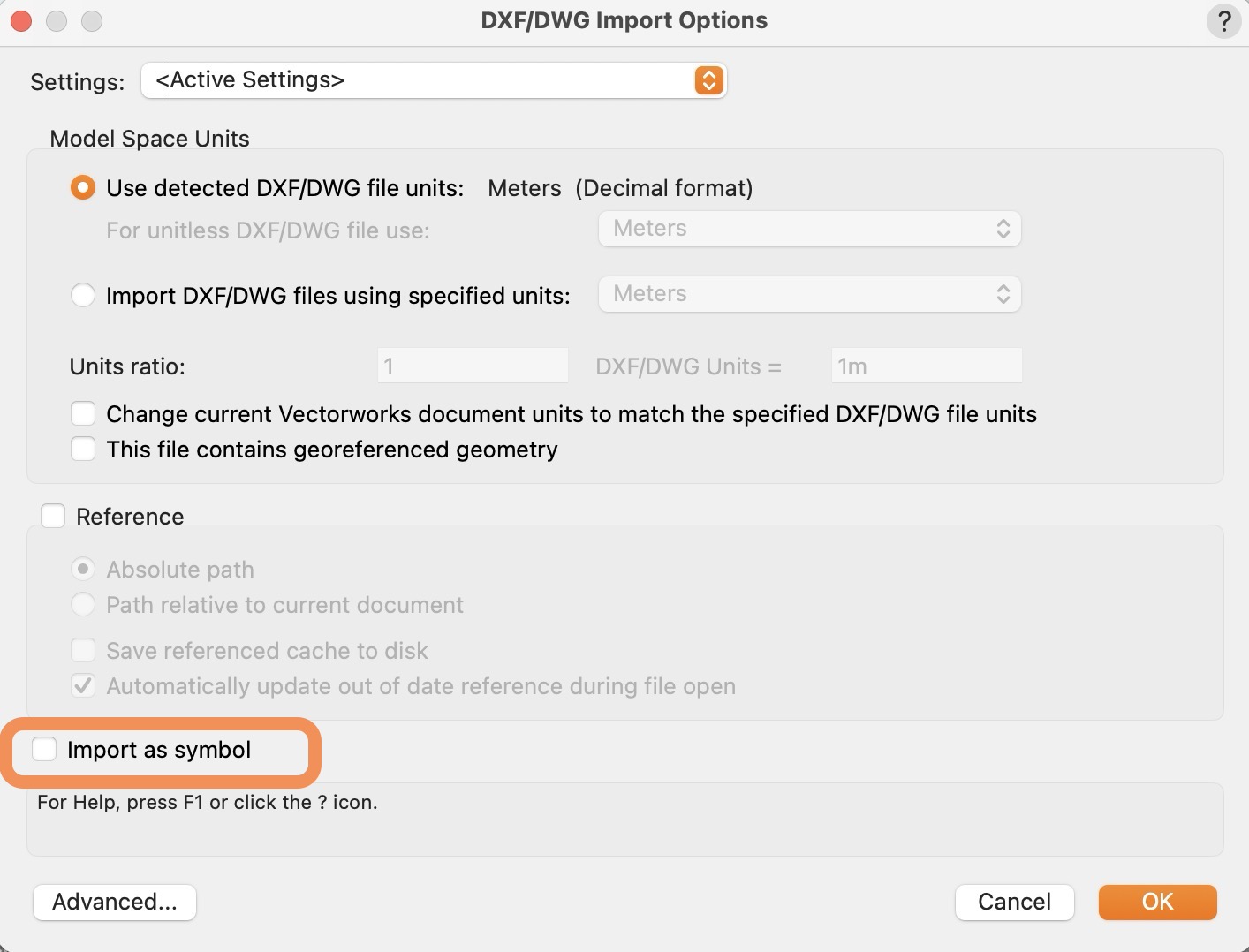
If they try to edit geometry the VPs in Layout Layers, that would not work as VW Viewports are exactly the same.
EDIT :
Looks like VW can not import ACAD Paper Spaces, convert them to Layout Layers or import Viewports. For me it imports Model Space only.
Looks like it can export VW Layout Layers to DWG (into Paper Space?). When you export while in the Layout.
So it should also import Paper Spaces to Layout Layers. I see standard Paper Spaces including their Viewports (out of scale). But not my generated Plans from BIM Sections.
As it looks like ACAD saves drawings in external DWGs (or just Bricscad BIM ?), they would need to import the Plan Files. Which would be normal editable Drawing Files, no Layouts (?)I do not have any example DWGs including Plans in proper Paper Space (Layouts ?)
I am not so experienced with 2D and Plan exchange as I usually deal with 3D Models only. But if you want you can upload or direct message a DWG and I could test it VW.
1 -
Thanks for your detailed reply yes that would be good I will try to send over a file tomorrow
0 -
Unless Vectorworks has changed things regarding to import it should be able to import layouts/paper space without major issues. When I used Vectorworks in the past I rarely had any significant issues other that perhaps text spacing due to shx fonts being converted to truetype fonts. That issue can be mitgated/solved by using standard truetype fonts in your BricsCAD drawing.
The one thing to be aware of is that any xrefs should be included with the main drawing that uses those xrefs.
Another possibility is that Vectorworks and Revit only recognize standard viewport and not drafting view viewports as the latter ones are not standard viewports. I.e. if you copy a regular standard viewport to another layout the contents will remain visible. If you try to copy a drawing view viewport to another layout you only get the viewport border without content so these drawing view viewports are somehow different. Perhaps this could be why Vectorworks and Revit cannot handle drawing view viewports if these are present.
0

