Application-specific Space Mouse customisation - which co's Devs do it?

Basically, where do I request Support, report bugs, make Feature Requests? Or who to blame for the often clueless, poorly calibrated implimentation, and the failure to respond for years on end, to users' frustrations on forums etc?
The user experience within applications is always in my experience, massively disappointing and frustrating, compared with the idealised smoothness of 3Dconnexion marketing and training videos https://www.youtube.com/playlist?list=P ... 7AD4F7BA13 and 3Dconnexion>home>Trainer. Is there a basic set of ideal functionality that can work in any Windows application - until each application's developers over-ride that and mess it up? Or not as simple as that!
Comments
-
This issue is bugging me again - anyone got anything?
0 -
I have both the two button spacemouse wireless (and an older wired space navigator as a spare) and the spacemouse enterprise and when it comes to the control knob there is no appreciable difference in navigation within the same program.
The extra buttons of the enterprise version are to replicate keyboard keys (like tab, esc, del, enter, ctrl etc) and some spacemouse function keys to preset views, lock rotation, zoom etc. and in the case of the enterprise version 12 command buttons at the top for issue BricsCAD commands like line, circle, sweep etc. or whatever you assign to them so that you don't have to take your hand off the spacemouse a lot to use the keyboard when simultaneously using the cad mouse.
I remember from Vectorworks that it is a kind bit of cooperation between the CAD developer and the 3D connexion people to have a standard/default set of tools/behaviours for the 3D mouse. Any further optimisation settings have to be communicated by e.g. BricsCAD.
This may be different for Twinmotion than for BricsCAD because of different use cases/workflows which could explain the difference in behaviour. In that case you will have to reassign the functions to the behaviours and buttons yourself where possible.
0 -
Hi RSW, i have the spacemouse enterprise but am struggling to programme the buttons to use within bricscad. When i press the menu button a bricscad specific menu of a few tracking modes and horizon lock come up, not the normal interface to reprogramme a button or add a radial menu. Have you had success in reprogamming buttons?
0 -
For anyone else looking for an answer to this below is my response in a pm to Chris
That menu button on the SpaceMouse Enterprise is not for changing
the button settings, it is more like the right mouse button menu that
can pop up in applications but without having to use the mouse.To change the button settings you need to open the 3DXware software, which
will then float over the other windows, click in BricsCAD to make that
window active. In the 3DXware panel you should see that BricsCAD is the
active program, then select the SpaceMouse Enterprise and there will be a
button in the lower dialogue area labelled "Buttons". When you click on
that you will get a dialogue showing all the buttons and there you can
change what the buttons will do.If you want I can make a screen recording to show the steps.
0 -
When i press the menu button a bricscad specific menu of a few tracking modes and horizon lock come up,
What Bricscad and Driver Version are you using ?
I miss that Bricscad setup menu for 3D Connexion so much. Especially the lock horizon option that I do not get in other ways. I lost that menu many years ago. When I press the Menu Button I only get the standard 3DConnexion Menu ("Show Driver Preferences, Toggle Dominant Filter, ……").
Also it lost all "Application Specific Commands" options, which were only available for a few years back then and got lost by neglecting support.
For me Enterprise is useless, with standard without the "lock horizon" or turntable mode. I put my Enterprise back in the cupboard since a few years.
I just took it out now because of this posting, to check if it works again. But no, nothing changed, still trackbll rotation and the only App command is "Fit" !? which does not work for Bricscad anyway ….
OK,
I see at least Macros work again0 -
Hi @zoomer is this issue on Mac or Windows, or maybe even Linux if you are still testing this?
With the latest driver and in V26 in BIM mode pressing the menu button on the Spacemouse Enterprise gives the pop-up menu with at the bottom the Lock Horizon, at least on Windows that is. (whether it works the way you want or not I cannot determine because I never had to use it)
0 -
Thanks @RSW this is on Mac.
I will look at it in Windows, latest W11.
(I thought it would have lost support on Windows some years ago too ?)Do you have Application Commands ?
the menu button on the Spacemouse Enterprise gives the pop-up menu with at the bottom the Lock Horizon
Sounds like the Bricscad PopUp Menu
On Mac I tried 3DConnection/Default - which doesn't anything, or 3DConnection/Show PopUp Menu - which opens the standard 3DCon PopUp, without lock horizon.
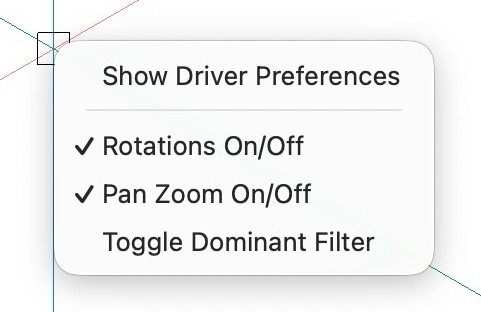
In the past I had some SRs concerning the loss of Horizon Lock.
It started missing in Bricscad Shape only and they fixed it. But with each new Version it wasn't working again for all Bricscads.0 -
At least I was able to tediously get "Zoom Extends" finally working with my Logitech MX Master 3S.
Which is not able to assign Macros to buttons like 3DConnexion can.
The only Bricscad Workaround is usually a "double middle click", which does hardly work as it gets ignored when you accidentally rotate the scroll wheel in between…Finally I could add a "SHIFT Click" Zoom Extends Action in Bricscad's UI Customization and add an "Extended Click (right click + SHIFT) to a side button.
I strictly avoided any UI Customization in Bricscad since V18 as it always lead to .config and UI corruption. Hope it will be good this time.
0 -
OK
I see see it is working in Windows …..
Bricscad Commands with Icons on its screen, …. and the lock horizon switch.The funny thing is, you only need to have access to horizon lock one time, then it would stay for that Bricscad version. (But on Mac you can't access it at all, neither by Driver nor by one of Bricscad's 5000+ Settings)
But the Enterprise's 3D Puck terribly lags for me !?
While the old original Space Navigator does navigate fast and perfect !?I think I still have Driver and Bricscad one version older, will have to update …..
EDIT :
OK, it works now as it should in Bricscad …. what a difference to Mac (Both Enterprise and Bricscad !)
0 -
The other day I read a 3DConnexion blog about the spacemouse devices in combination with BricsCAD and it stated that Lock Horizon is not available on MacOS
0 -
It is indeed no more supported, especially on Bricscad Mac, and lock horizon no more available in any normal way.
In the past, when pressing the Menu button, you would get the same Bricscad 3D Mouse dialog as you still get on Windows. Plus the Application specific Command list to assign to buttons
But I found it and lock horizon is still there.
It is basically part of Bricscad Settings - just not "implemented" or user accessible in the Settings dialog, for whatever reasons. There is no Option to find in Settings, when searching for "horizon".
Bricscad Settings on Mac reside in a hidden Config Text File called ".config". Meanwhile, at least since V26, it is now hidden in an invisible ".bricscad" Folder, as "config" which now lost the "." prefix to hide in Finder. (This file still contains the Settings of all(!) Bricscad Versions that you ever installed on this machine)
The hidden folder is located in the (also hidden by default) User Library / Preferences
Make sure all Bricscads are closed. If you open "config in TextEdit App and (CMD+F) search for "lockhorizon" you may find one or more (n times Bricscad installations) entries : "LockHorizon=0". Run through these and change the value to "1" if you want restrict to Turntable Rotation, like "LockHorizon=1". Save the "config" File and Bricscad(s) on Mac will have Lock Horizon enabled.
0

