etransmit crash messed up paths to xref's and blocks

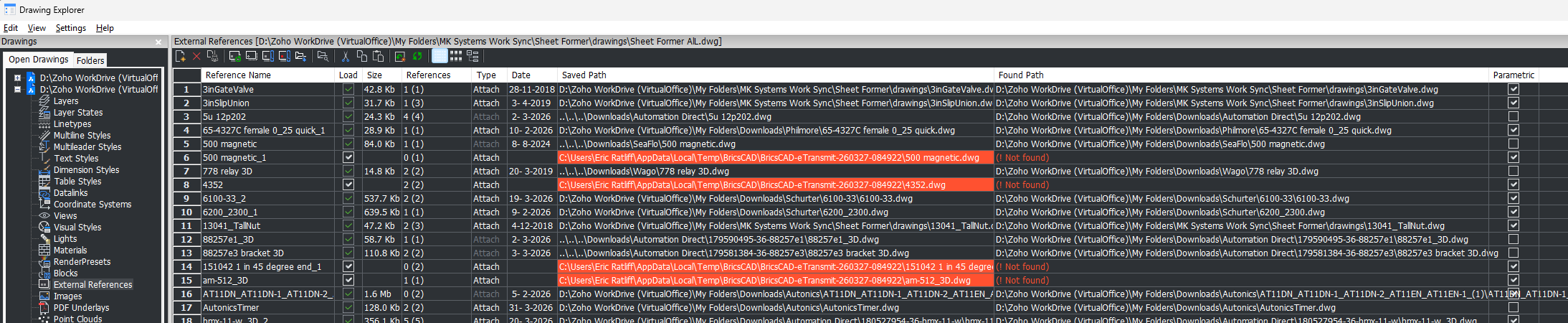
A month or two ago Bricscad crashed during an etransmit command. Paths of referenced files now have 'AppData…eTransmit' in their paths. So, they are not found when I open the drawing I was trying to back up. In other words, trying to back up resulted in corruption of my drawing.
I have been manually fixing the blocks in the Attachments pane (not sure what an attachment is, but blocks reference files there).
The remaining problem is that some xrefs have the wrong path and I can't just browse to the right path. I fear I will have to manually re XATTACH each of these XREF's.
Any suggestions on fixing the XREF paths? I would like to preserve their locations and orientations. I am running V25.2.05(x64) under Win 11 to fix the pathe. I might have done the etransmit under V26, but not sure, probably V25.
Comments
-
Did you google " Xref change path Autocad lisp" pretty sure there is code out there to do that task.
One example.
https://forums.augi.com/showthread.php?111706-Changing-Xref-location-through-lisp
0 -
Thanks AlanH,
I googled as you suggested. There, -XREF with path option was mentioned. Here is what I found trying that.
-xref works with path option. Just name the xref, such as DoubleSwitch (for example). It shows the old original path. Refuses to update if I use that one, ..\..\..\Downloads\Automation Direct\DoubleSwitch.dwg. Use another way, absolute path. That one updates and path is no longer listed as not found in drawing explorer. Now that the path is found, it refuses to update again to the relative path. Just giving the name of the refrence makes it say “0 references updated.” So now I’m stuck with the absolute path. I suppose I can live with that.
0 -
From SETTINGS in the problem drawing(s) I would try setting up a PROJECTNAME

Then set up the PROJECTSEARCHPATHS for the same Project Name. Under each project name you can have multiple search paths.

Once you've done this, SAVE, then re-open the drawing. Because the drawing is now associated with a project BricsCAD will search the relate folders for any attached dependencies.
Jason Bourhill
CAD Concepts Ltd
0

