Parametric wardrobe, kitchen & interior door automation — speed up your 2D furniture drafting?

Body:Hi everyone,
I noticed that many furniture designers, architects, and technologists still rely heavily on 2D drafting for shop drawings, floor plans, and elevations. Drawing every side panel, plinth, shelf, and gap line by line—especially for complex layouts like kitchen cabinets, custom wardrobes, and interior doors with their frames—can be incredibly tedious and time-consuming.
I am currently developing a parametric wardrobe and cabinet generator for BricsCAD. While it utilizes smart parametric logic, one of the main goals is to instantly generate clean, accurate 2D views, sections, and production layouts for closets, kitchen modules, and interior door assemblies without the manual chore of drawing individual lines.
If you are detailing furniture, kitchens, doors, or custom cabinetry in 2D, I would love to hear your thoughts:
- What are the most repetitive tasks in your 2D furniture and joinery drafting workflow?
- What features would you look for in an automation tool to make your shop drawings faster? (e.g., automatic dimensioning, instant section views, frame/casing detailing, corner solutions, or hardware positioning).
Any feedback from practical 2D drafters would be highly valuable!
(Note: I also posted a thread in the 3D Modeling section, but I wanted to get the perspective of those who live and breathe 2D drafting every day).
Comments
-
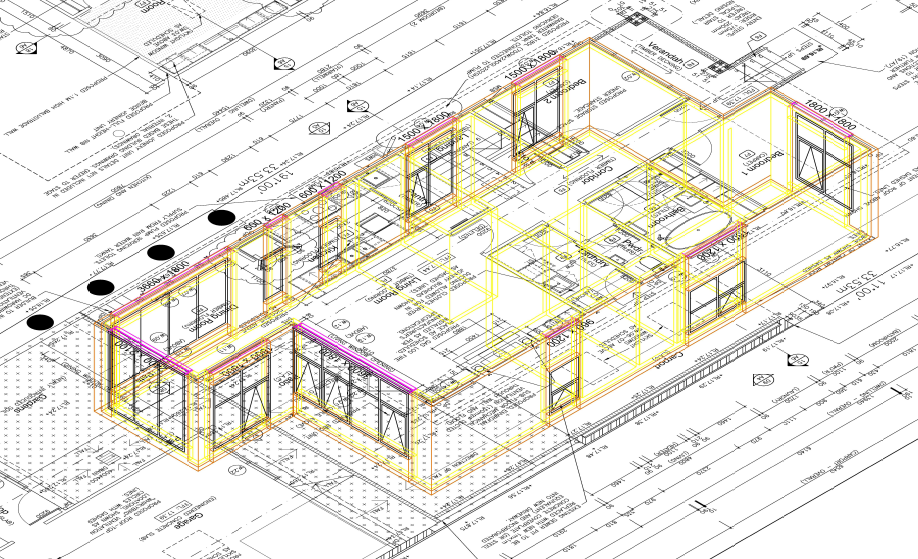
This is actually 2D, package developed around the 90's. Uses a simple thickness to give impression of 3D. Yes has elevations and so on.
 0
0 -
Hi Tim,
Thanks for the reply!
I really like the approach ALANH showed in the screenshot—using 2D with thickness to simulate 3D is a classic, lightweight way to handle CAD geometry.
I'd love to hear your thoughts on this. Do you think a similar approach would work well for a modular wardrobe generator, or do you prefer using full 3D solids from the start?
Looking forward to discussing this further!
Regards,
Zenon0 -
EN V2B34 — Parametric CAD/CAM Furniture Engine — open to custom AutoLISP work
We are building a central parametric CAD/CAM engine for wardrobes, walk-in closets and built-in furniture. Instead of drawing every wardrobe manually, the user changes parameters and the engine rebuilds the 3D model: cabinet body, shelves, drawers, hanging rods, filler panels, plinths and, later, automatic dimensions on layout sheets, plans and sections.
The project is developed in BricsCAD / AutoLISP. The current focus is correct geometry, construction rules, variants, safe rebuilds and a stable central engine. CNC, BOM and cutting lists are planned later.
What the system can control
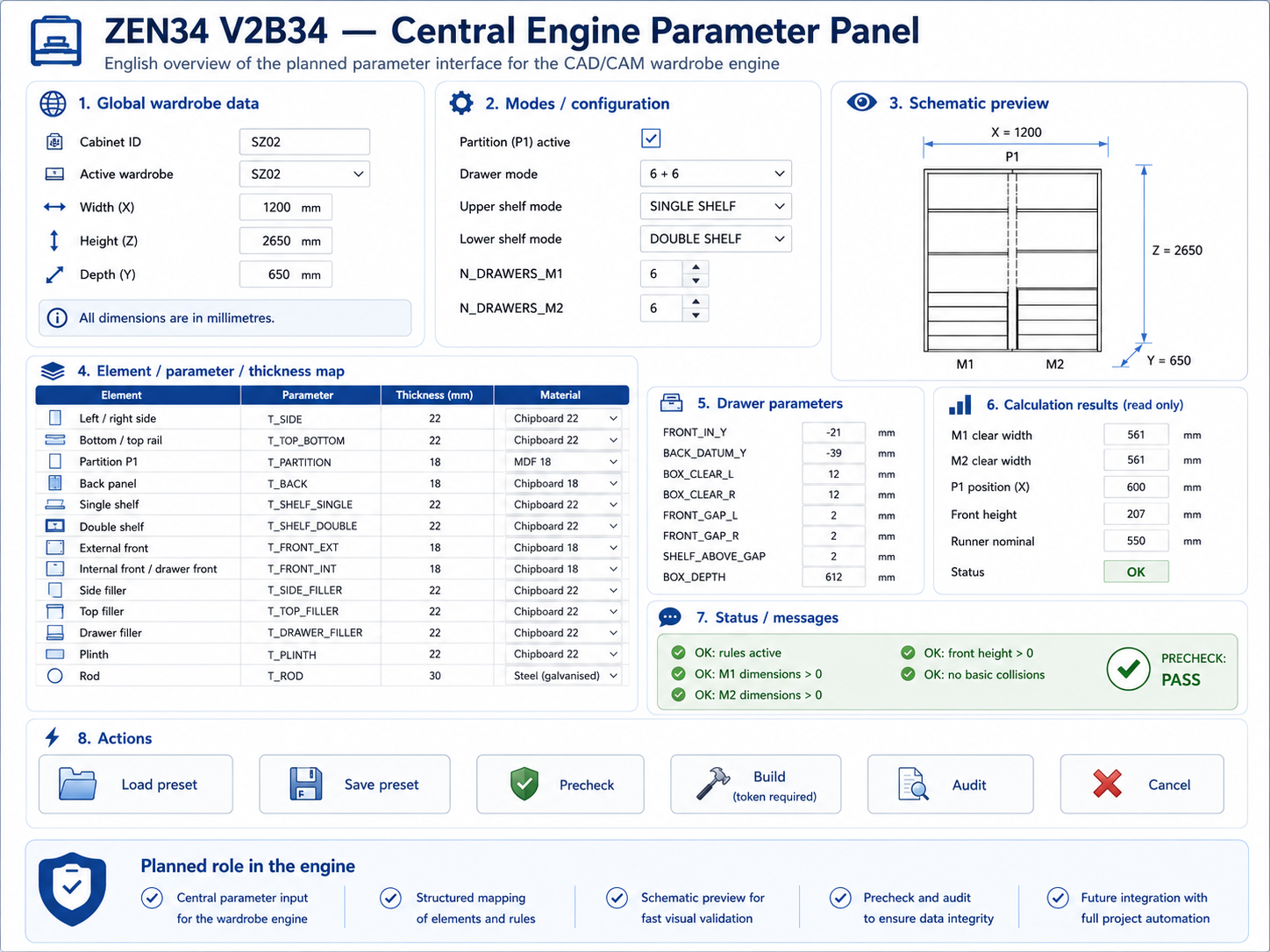
The model supports wardrobes with or without an internal partition. It can work as an M1 / M2 layout with a P1 partition, or as a full wardrobe without a partition.
The system can change:
- width, height and depth,
- partition on / off,
- single or double shelves,
- automatic or manual shelf positions,
- automatic or manual drawer fronts,
- drawer box depth adjusted to cabinet depth and runners,
- hanging rods under a shelf or positioned manually,
- filler panels and plinths,
- thicknesses of sides, shelves, backs, fronts and other elements.
A key locked rule is:
SHELF_ABOVE_Z1 = highest drawer front Z2 + 30 mm
This rule works for both M1 and M2.
Current stable checkpoint
Current PASS file:
SZ01_MASTER_V2B34_V8_V12_MASTER_V26E_FIXB_REKA_AUTO_MIX_POLKA_ZAWSZE_30_PASS.dwg
This file has DBMOD = 0 and is the current rollback point.
Confirmed in this checkpoint:
- M1 shelf above drawers: highest drawer Z2 = 472, shelf Z1 = 502, gap = 30 mm,
- M2 shelf above drawers: highest drawer Z2 = 732, shelf Z1 = 762, gap = 30 mm,
- 6 drawer fronts,
- 12 drawer box sides,
- 6 drawer bottoms,
- 6 drawer backs,
- 2 shelves above drawers,
- 8 ordinary shelves,
- 2 hanging rods,
- 4 drawer-side filler panels,
- 4 support bases,
- 4 internal side panels,
- P1, BCT, SZ02 and SZ03 protected.
Project demonstration
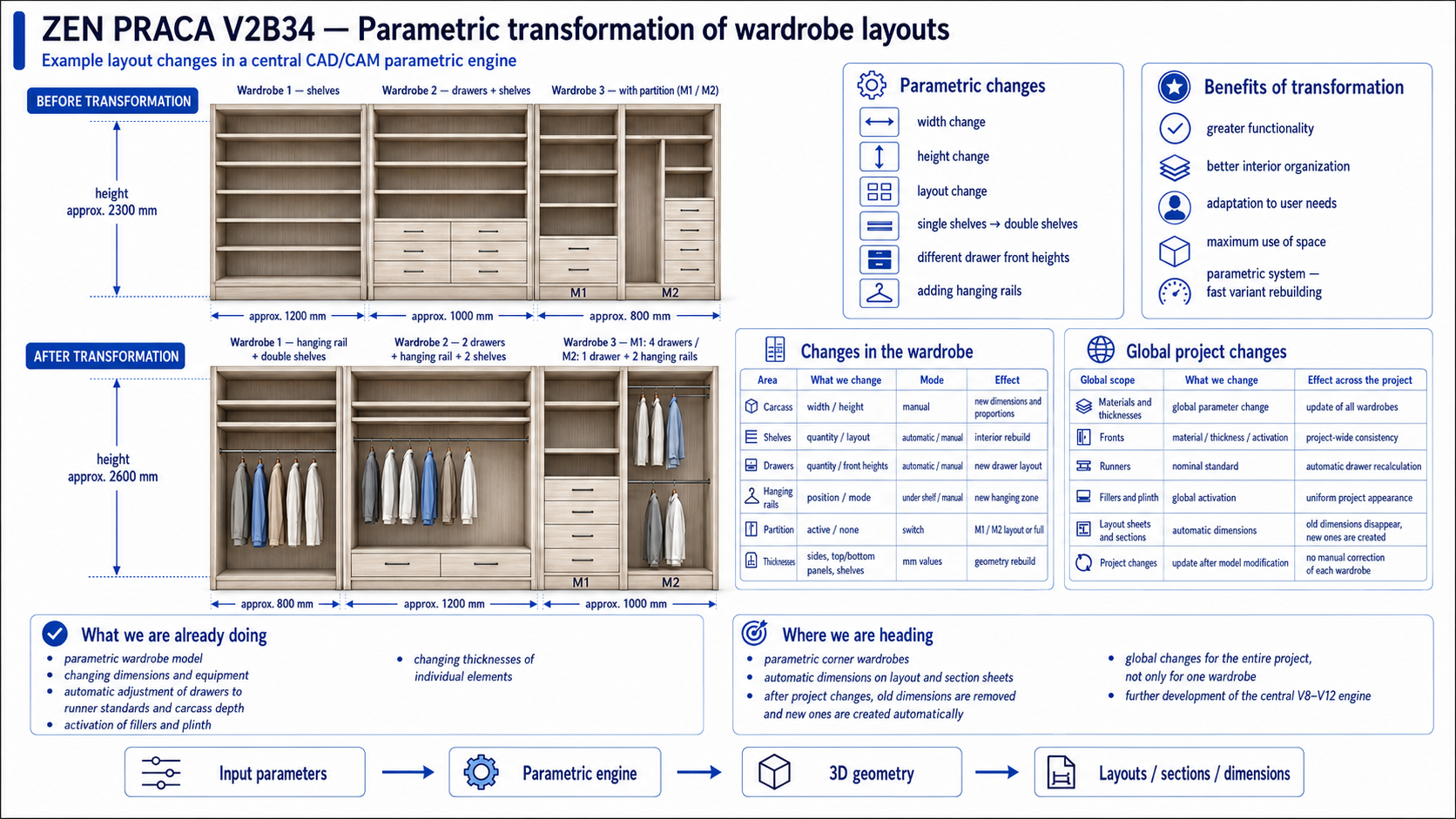
The system can show three wardrobes standing next to each other in one built-in wall. After changing parameters, the same wall can rebuild with different widths, heights and internal layouts.
Example:
- before: height about 2300 mm, widths 1200 / 1000 / 800 mm,
- after: height about 2600 mm, widths 800 / 1200 / 1000 mm.
The transformation can change lower shelves into a hanging rod, replace single shelves with double shelves, change drawer quantity, use different drawer front heights, and add rods in different modes.
This is not manual redrawing. The goal is: change parameters, rebuild the model.
Single wardrobe parameter table
Area
Change
Mode
Result
Cabinet body
width, height, depth
manual / preset
new overall size
Partition
on / off
switch
M1/M2 or full wardrobe
Shelves
quantity, height, type
automatic / manual
rebuilt shelf layout
Double shelves
on / off
automatic / manual
double shelf system
Drawers
quantity, front heights
automatic / manual
rebuilt drawer package
Shelf above drawers
position
rule-based
always 30 mm above top drawer
Rods
position
under shelf / manual
hanging zone
Filler panels
on / off, width
switch / value
side package update
Plinth
on / off, height
switch / value
base update
Thicknesses
boards, backs, fronts
mm values
geometry rebuild
Runners
nominal standard
automatic
drawer depth adjustment
Planned global changes
Global scope
Change
Project-wide effect
Materials and thicknesses
board and element parameters
update all wardrobes
Fronts
material, thickness, type
consistent design
Runners
nominal standard
drawer depths recalculated
Fillers and plinths
global on / off
consistent built-in layout
Shelves
single / double
shelf systems rebuilt
Drawers
quantity and front heights
drawer packages rebuilt
Rods
under shelf / manual
hanging zones rebuilt
Layout sheets
automatic dimensions
old dimensions removed, new ones created
Whole project
multiple wardrobes at once
global control, not one wardrobe only
Next plans
Next we will run operator-input tests: the LSP asks for values, the user enters real parameters, and the engine validates the result. This will test manual drawer heights, manual shelf positions, automatic shelves, rods, dimension changes and the locked 30 mm shelf-above-drawers rule.
After M1/M2 tests, we plan to transfer the same logic to a fresh FULL wardrobe without a partition. Later we want global changes for the whole project and automatic dimensions in layouts, plans and sections.
Future expansion
The engine may later support:
- kitchen furniture,
- internal doors,
- decorative wall panels,
- wall panels with mirrors,
- wardrobe fronts with aluminium frame + glass,
- wardrobe fronts with aluminium frame + mirror,
- routed fronts and other front systems.
The goal is one central parametric engine, not separate scripts for every product type.
Final direction
We are building a V8–V12 central engine for parametric wardrobes and furniture built-ins. A parameter change should rebuild the model, not require manual drawing repair. This is the foundation for wardrobes, walk-in closets, full wardrobes, partitioned wardrobes, corner wardrobes, kitchens, doors, wall panels and front systems.
 0
0
