Tab Bar Moves Back to First Sheet When Swapping to Model Space

If I have a file with 20 paper space sheets and I navigate to any of the tabs not visible, like tab 19, as soon as I click back into model space the tab bar goes back to the first paper space sheet. Is there any system variable to prevent this, or any shortcuts to navigate quickly to hidden sheets?
Comments
-
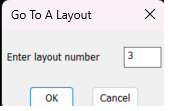
I use this it is in lots of other software not sure why not in CAD programs. as per name Goto a layout, had a 88 layouts dwg so would goto 1 where index was and then Goto X as knew now the correct layout number. Type Goto 99 will go to last. I have it autoloaded
 0
0 -
Click on the three little lines just left of model tab to access the layout manager
0 -
Unfortunately, you cannot select any of the layouts when you do that.
0 -
Thank you…I'll definitely give that a try.
0 -
There is actually a command in BricsCAD called "CTAB" that allows you to select which paper space sheet you want to view.
0

