Supercharging BricsCAD Data Extraction with PyRx, Pandas, and DuckDB

If you have ever tried building a custom data extraction tool for BricsCAD using the classic COM/ActiveX interfaces or vanilla LISP, you know it can quickly turn into a headache of nested loops, slow execution, and rigid data structures.
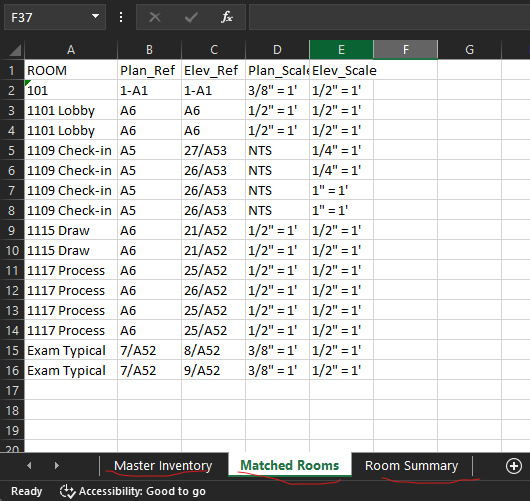
This post demonstrates a modern, high-performance approach to CAD data mining. By combining PyRx (the Python wrapper for BricsCAD’s native C++ BRX API) with the data science power-duo of Pandas and DuckDB, you can extract block attributes, run complex relational queries on your drawing, and export styled reports to Excel—all in a fraction of a second.
Why This Stack Rules:
- PyRx (BRX Speed): Operates at the native C++ memory level. It reads drawing databases instantly without the COM automation bottleneck.
- Dynamically shapes blocks into structured tables, sanitising whitespace and handling missing columns gracefully.
- DuckDB (In-Memory SQL): Allows you to write standard SQL (JOIN, GROUP BY, LIST) directly against your live Pandas DataFrames in memory with zero setup overhead.
- wxPython (Native UI): Leverages BricsCAD’s built-in UI layer to provide a clean, modern file dialog.
"""
CAD Data Extractor & Auditor
Stack: PyRx (ObjectARX), Pandas, DuckDB, wxPython, openpyxl
Context: Extracts block attributes into dataframes, runs relational audits
         via SQL, and exports the structured results to a multi-tab Excel file.
"""

from pyrx import Ap, Db, Ed
import pandas as pd
import duckdb
import os
import wx


@Ap.Command()
def doit():
    try:
        # --- 1. INITIALIZE AUTOCAD & SYSTEM CONTEXTS ---
        app = Ap.Application()
        wxapp: wx.App = app.wxApp()  # Access CAD's native wxPython application instance
        db = Db.curDb()  # Get the current active database
        bt = db.blockTable()  # Access the drawing's Block Table

        # Dictionary to store structured Pandas DataFrames for each unique block type
        # Key: Block Name (str), Value: DataFrame
        drawing_tables = {}

        # --- 2. FAST DB ITERATION & DATAFRAME GENERATION ---
        # PyRx lets us unpack names and Object IDs directly from the Block Table
        for block_name, btr_id in bt:

            # Skip anonymous blocks (*U...) and temporary audit blocks (A$...)
            if block_name.startswith("*") or block_name.startswith("A$"):
                continue

            btr = Db.BlockTableRecord(btr_id)
            if btr.isLayout():  # Skip Model Space and Paper Space layout definitions
                continue

            rows = []
            # Query all physical references (insertions) of this specific block definition
            for ref in btr.getBlockReferences():
                # Performance Optimization: Skip blocks without attributes immediately
                if not ref.hasAttributes():
                    continue

                # Fetch attribute tag/value pairs cleanly via PyRx helper
                attrs = ref.attdict()
                if attrs:
                    # Clean trailing/leading spaces from drafting data and log the parent block name
                    cleaned_attrs = {k.strip(): v.strip() for k, v in attrs.items()}
                    cleaned_attrs["BLOCK_NAME"] = block_name
                    rows.append(cleaned_attrs)

            # Convert the list of dictionaries into a Pandas DataFrame
            if rows:
                drawing_tables[block_name] = pd.DataFrame(rows)

        # Fail-fast if the drawing has no attribute metadata to process
        if not drawing_tables:
            print("\nNo block attributes found in this drawing.")
            return

        # Extract target datasets safely using .get() to prevent KeyErrors if a block type is missing
        df_plan = drawing_tables.get("plan", pd.DataFrame())
        df_elev = drawing_tables.get("elev", pd.DataFrame())

        # Consolidate all individual block dataframes into one master inventory sheet
        # Pandas auto-aligns columns, filling mismatched attributes with NaN/None
        df_master = pd.concat(drawing_tables.values(), ignore_index=True, sort=False)

        # --- 3. RELATIONAL IN-MEMORY ANALYTICS VIA DUCKDB ---
        df_inventory = df_master.copy()
        df_rooms_matched = pd.DataFrame()

        # Query 1: Relational JOIN - Find where both 'plan' and 'elev' blocks coexist in the same ROOM
        if not df_plan.empty and not df_elev.empty:
            query_join = """
                SELECT p.ROOM, p.REF as Plan_Ref, e.REF as Elev_Ref, p.SCALE as Plan_Scale, e.SCALE as Elev_Scale
                FROM df_plan p
                JOIN df_elev e ON p.ROOM = e.ROOM
                ORDER BY p.ROOM
            """
            # DuckDB automatically scans the local Python scope to query df_plan and df_elev directly!
            df_rooms_matched = duckdb.query(query_join).to_df()

        # Query 2: Aggregation & Array Aggregation - Find busy rooms and list their layout contents
        query_aggregate = """
            SELECT ROOM, COUNT(*) as Total_Blocks, LIST(DISTINCT BLOCK_NAME) as Block_Types_Used
            FROM df_master
            WHERE ROOM IS NOT NULL AND ROOM != ''
            GROUP BY ROOM
            HAVING Total_Blocks > 1
            ORDER BY Total_Blocks DESC
        """
        df_summary = duckdb.query(query_aggregate).to_df()

        # --- 4. NATIVE INTERFACE FILE DIALOGUE ---
        # Launch a Windows File Dialogue properly parented to AutoCAD's main window
        dialog = wx.FileDialog(
            wxapp.GetMainTopWindow(),
            message="Save Data Extraction Results As",
            defaultDir=os.path.expanduser("~\\Documents"),
            defaultFile="Drawing_Extraction.xlsx",
            wildcard="Excel Files (*.xlsx)|*.xlsx",
            style=wx.FD_SAVE
            | wx.FD_OVERWRITE_PROMPT,  # Automatically handles file overwrite warnings
        )

        # Handle user choice safely
        if dialog.ShowModal() == wx.ID_OK:
            export_path = dialog.GetPath()
            dialog.Destroy()  # Manually clean up UI memory
        else:
            print("\nExport cancelled by user.")
            dialog.Destroy()
            return

        # --- 5. MULTI-TAB EXCEL EXPORT (via openpyxl) ---
        with pd.ExcelWriter(export_path, engine="openpyxl") as writer:
            # Sheet 1: Flat, raw master data dump
            df_inventory.to_excel(writer, sheet_name="Master Inventory", index=False)

            # Sheet 2: The relational architectural audit results
            if not df_rooms_matched.empty:
                df_rooms_matched.to_excel(writer, sheet_name="Matched Rooms", index=False)

            # Sheet 3: Aggregated data metrics
            if not df_summary.empty:
                # DuckDB's LIST type creates a Python array. Flatten to string for clean Excel display.
                df_summary["Block_Types_Used"] = df_summary["Block_Types_Used"].astype(str)
                df_summary.to_excel(writer, sheet_name="Room Summary", index=False)

        print(f"\nSuccess! Excel file written to: {export_path}")

    except Exception as err:
        print(f"\nError: {err}")
Comments
-
Exploring DuckDB a bit more, I found it can be used to query any python dictionary, here’s a sample playing with layers
from pyrx import Ap, Db, Ed, Ge
from collections import defaultdict
import duckdb

def duckdb_relation(raw_data : dict) -> duckdb.DuckDBPyRelation:
    df_data = duckdb.values(raw_data)
    return df_data.select("unnest(columns(*))").select("unnest(columns(*))")

@Ap.Command()
def doit():
    db = Db.curDb()
    lt = db.layerTable()
    raw_data = defaultdict(list)

    for name, id in lt:
        ltr = Db.LayerTableRecord(id)
        clr = ltr.entityColor().makeTrueColor()

        raw_data["Name"].append(name)
        raw_data["On"].append(ltr.isHidden() == False)
        raw_data["Locked"].append(ltr.isLocked())
        raw_data["Frozen"].append(ltr.isFrozen())
        raw_data["Color"].append(clr.toHTMLColor())

    res_rel = duckdb_relation(raw_data)
    filtered_rel = res_rel.filter("Color == '#FF0000'").select("Name")
    names_list = [row[0] for row in filtered_rel.fetchall()]

    print(f"\nFiltered Red Layers: {names_list}")
#Filtered Red Layers: ['ANO2', 'A-PFIX', 'NEW_DOORS', 'NEW_STAIRWELL', #'NEW_FIRE_EXTINGUISHER', 'A-FURN-P-FILE', 'WKSURF', 'A-FURN-P-PHWL-70', 'A-FURN', #'A-FURN-P-FILE-T', 'A-FURN-P-PNLS', 'ZAXIS', 'DESK-VIEW', 'DESK-TYPE', 'DESK-OTHER', # DESK-FINISH', 'DESK-PROD_NO', 'DESK-DRWCFG', 'DESK', 'A-FURN-P-PNLS-53']
0 -
Could this stack be used as a database foundation alternative to Bill of Materials, exported to excel including summing formulas?
My 3D mechanical blocks use Mechanical Custom Properties, which are embedded in the DWG, some blocks have visibility states as parameters, the BOM generations is painfully slow. As block count increases, performance drastically falls off, frustratingly slow every time trying to save. External sqlite type database solutions are lightning fast. Shame BricsCAD didn’t implement the same strategy as Plant 3D.
0 -
I haven’t played with mechanical properties, or Plant 3D, but assuming it’s possible to extract the data with Python(PyRx), then absolutely, Pandas + DuckDB, or Polars + DuckDB would be amazing. Note OpenPyXL doesn’t have a formula evaluation engine, but you can write in formulas for excel to evaluate. Or just use Pandas, it will compute {sum},{avg} etc.
Full disclosure, I’m not an expert in Pandas, just kicked the tires, some of my older tests
https://pyarx.blogspot.com/search/label/pandas0
