Multi page PDF don't print

Recently I've migrated across from AutoCAD and having trouble with the Multi page PDF.
It creates it OK, can view it in Acrobat reader as normal but when i go to print it, it throws and error message.
But, strangely, i can print each page individually?
Have lowered all the output settings, tried to print as an image, printer driver is updated etc.
Anyone else had this issue or any clue on how to fix??
Comments
-
Do you create multi page PDF in BricsCAD then print to paper from Acrobat? If separate pages are printed correctly, did you try to output separate pages then join them (as I know, Acrobat can combine files) and print?
0 -
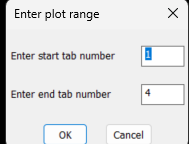
Seperate pdf's can be joined into one pdf, using GHOSTSCRIPT, I have a plot lisp that does just that plots single pdf's from a range of layouts then joins them all back into one PDF, all from within the lisp. You will need to download Ghostscript and edit code to suit. The code here must have the window variables changed for the title block in a layout. Save Multi getvals.lsp to a support path or put full path into (load " it can be used in any lisp program.
 0
0 -
A question that I didn't see asked… are you using print or publish for creating multi-page PDF's. In my experience publish is more reliable than print to pdf for multi-page pdf's.
0 -
When using ACAD had lots of problems using Publish at times hence the Plot Range.lsp was created.
Also as we only worked on one dwg at a time did not need the multi plot separate dwg's, if that is needed then yes use publish. But a trick version of plot range will do it also. The other advantage with using a lisp was from a pop menu pick "Plot range" enter max number, open pdf and walk to the printer etc. No need to set up the Publish window.
A side note you can automate the creation of a DSD file that is used by publish. When you type publish you will see it prefilled.
0