Drawing Label "CANNOSCALE" Field reference

Hi all,
I'm having an issue with text field references to CANNOSCALE when used in viewports. If I refresh the fields while inside model space, the annotation scale displays properly in the field, but if the drawing is plotted or I switch layouts in the layout tab, the annotation scale updates to the paper space scale of 1:1, which is obviously incorrect for a viewport. My job has a custom label block that worked fine in AutoCAD for automatically displaying viewport scales… Does anyone have a workaround for this problem? I'm racking my brain on how I could write a script that can fix this but I'm not sure if it's possible without a full plugin.
Comments
-
Maybe the simplest, a viewport in a layout has a property "Customscale"
(setq obj (vlax-ename->vla-object (car (entsel "\nPick Vport "))))
(setq sc (vlax-get obj 'custom scale))
In the mtext Field you can select Object, pick vport then Custom Scale. Yes it changes as you zoom etc. The mtext is in paperspace.
0 -
I'm looking for a way to dynamically display viewport scale without having to individually select each viewport in each layout. It would be faster to just type the scale in each label than do this for each viewport.
0 -
post a sample that works in Acad so people can see the field code
0 -
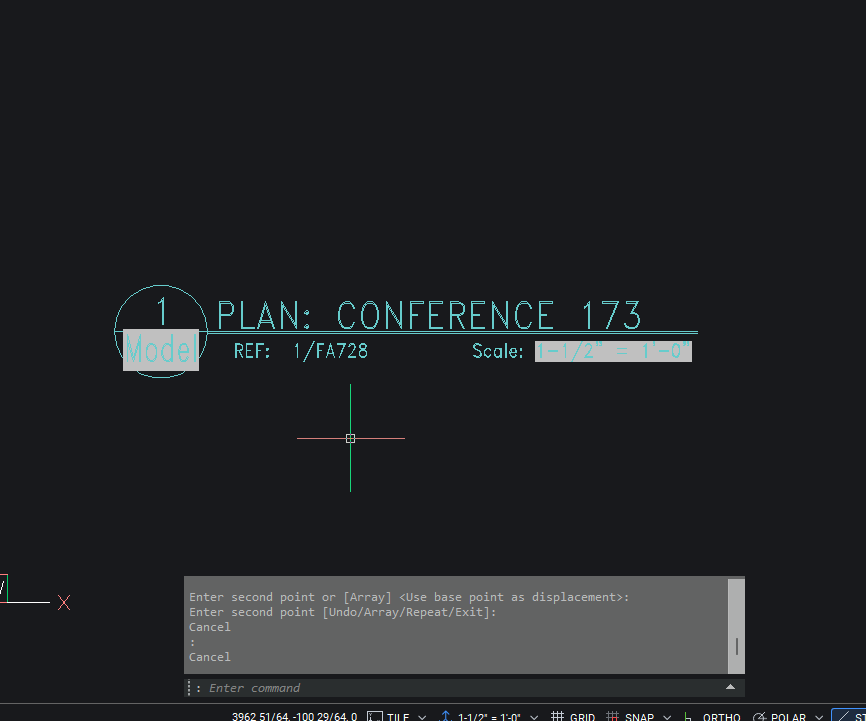
Here's our standard drawing label block. The "Scale" field contains this code: %<\AcVar CANNOSCALE>%
The problem is with the way BricsCAD uses the CANNOSCALE system variable inside viewports. If I go inside my floating viewport into model space and force an update of the fields inside that viewport, it displays the correct annotative scale. But when I change layout tabs, it resets back to the 1:1 annotative scale of paper space. This also happens when I go to print or publish.
0 -
This problem was reported via support requests also, but it has been postponed.
0 -
Like @Its_Alive it sounds like you copy a master layout so a viewport has a field, editing that master to use Custom scale * scale should work.
0