automation / MCP / current limits

Hi.
I am finding ways to automate work in BricsCAD for my colleagues (currently Pro, going into BIM next month).
First disclaimer; I only started using BricsCAD few months ago and I call myself a mere beginnner, regarding manual work in this app.
But that seems like a littel obstacle only, as my way is connecting Claude (and other agentic LLMs in future) through an MCP connector. So almost do not touch BricsCAD directly anymore.
Currently I am using and customising this MCP connector;
It does basically anything I imagine, though I can tell a difference between this connection and e.g. Claude+Rhinoceros8 (and Grasshopper), where you can do magic of different kind, and on a different level really.
Anyway, my questions;
Do you guys have some experience in this kind of workflow?
If yes, have you encountered some limits of it already? Where it fails for you, where it's inefficient?
I have one major worry; as I am customising / expanding the MCP connector almost daily, should I be afraid that on day, the MCP will be so vast that Opus5.5 / Fable5.1 won't be able to use it effectively, in it's full potential?
And how do you work with LISP library creation and maintanance?
I mean, do you keep specific LISPs as used on specific projects, or do you "generalize" them in a way, so they can be more easily repurposed within future projects? How do you share them between team members, so that it's clear which LISPS have which capabilities?
Do you make huge LISPs capable of anything, or do you cut them into smaller pieces?
Many more questions may follow, but maybe you have totally different attitude so please share anything on topic of automation regarding LLMs and BricsCAD…
Jonas
Comments
-
Last question generally one lisp does one function. Some lisps have multi functions inside but have a top theme.
I have a install.lsp to do just that set up CAD to match company standard. Support paths , menus, save code, blocks and so on. Where I worked last we used a server so 99% of code, menu's and blocks were on server, any code update was then available on next startup, same with menu's. So very limited on CAD PC.
With around 3000 lsp's can find something close as a starting point for a new task and modify. A lot of code I do is Global rather than hard coded may require an extra pick or two eg "pick object for layer name"
Around 130 lisp's behind this.
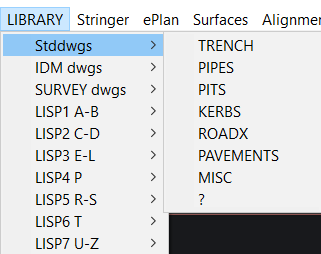
Hope this makes sense.
0 -
I prototyped some stuff for local LLM thinking it would be cool to write up a harness with PyRx. LLMs are pretty good at Python, having tools to load and run scripts is probably enough.
- tool_appload
- tool_pyload
- tool_pyreload
- tool_exec_command , or call py_func
- tool_call_lisp_func
- tool_evaluate_lisp
You’re asking the right questions, some of my observations.
- start with existing methods of increasing productivity first, you and your colleagues likely work in a specific genre. Setting up drawing templates, with fields, blocks, and rolling your scripts will get you most of the way there.
- AI is non deterministic, even with strict guidelines, you’ll likely never get the same drawing twice. You’ll likely lose any productivity gains when it comes time to make revisions
- AI’s don’t have infinite context windows, and there’s no good feedback mechanisms, how is AI going to differentiate between a collection of arcs, circles, lines and an object?
IMHO, some fully automated AI generated drawing would be better off done in something like ezdxf where you could instruct the model to generate blocks to represent objects. Models can read DXF, and by dividing up the project into component blocks, the model can make changes that don’t break the whole drawing
0 -
What I’m currently doing with BricsCAD+MCP is generating LISP code and performing semi-automatic code modifications. I believe that if I devote enough time to it, I could automate the process all the way through to packaging, but I haven’t gotten that far yet.
I’m using FastMCP as the basis for MCP, with just a few customizations, and running it in BricsCAD via COM.Generated programs tend to accumulate, so I organize functions that can be used as highly versatile routines into separate files by function, making them readily available during generation.
Sometimes I have the system generate the necessary functions in advance.In my case, since I already have experience with CAD customization and existing programs, I’m using AI to organize and expand upon that foundation.
The original article is in Japanese, but I’m sharing it here for reference.
Given that we’re in a transitional phase in many respects, I believe there’s a high likelihood that the optimal approach will have changed fundamentally in three months’ time. Therefore, I think the smartest approach is to take small steps to improve the efficiency of our existing design style—thereby achieving tangible results—while simultaneously transitioning to an AI-based workflow.
With AI-generated programming, language barriers are becoming less of a concern, so I’ve started thinking that it might be possible to use LISP to convert binary data into file formats—like JSON—that AI can handle more easily.
Also, just for fun, I created a feature that gradually converts images into CAD objects.
It might even work as a bitmap editor for creating icons. 😋0 -
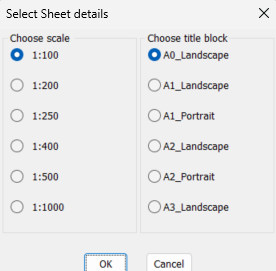
One of the tasks I looked at was repeated input say multiple values, line after line in lisp, so I wrote a few make dcl's on the fly. They only need like 3 lines to work. One of the things in lisp is can load another lisp in the middle of the program so that "Library" function can live out side of your code. There is examples in the code.
What I am trying to save is rather than have AI write the same defun again use one what you already have and that has been tested and works.
Your welcome to use these have a couple more. This image is 4 lines and returns 2 string answers. There is some other variables that can be used for which choice, eg but =1, but2=1
 0
0

