Can You Trim A Font?

I have some artwork that I want to show on a wall in one of my elevation views.
The artwork is a series of entities, including some words that are actual fonts.
The way the artwork was originally created, some of the portions of some of the letters in the words extend outside of the border of the artwork frame.
It would be easiest for me if I could simply trim the portions of those letters that are outside of the frame, but the 'Trim' command seems to have no effect on fonts.
Is there another way I may be able to cut off just a portion of these letters, by maybe somehow converting the letters from fonts to some other type of entity?
Comments
-
Explode text is the command you're probably looking for.
0 -
I would be more inclined to convert the artwork to a PNG with transparency, trim in Gimp, then insert the PNG. True Type fonts fill to their outline, which is essentially zero width, so the edges are sharp. When you explode text the character becomes linework so you have to deal with pen widths. An exploded character will not be the same size as the original or have the precise edges of the original. That may not matter depending on scale and on how prominent the artwork is.
0 -
David, that worked great, thank you!
0 -
Martin, thank you for the advice. The method David worked seemed fine for this specific need and since it was so easy, I am all set for now.
I appreciate you providing an alternate method though, and will be referring back to this in the future for another use case I'm sure.0 -
If you wanted to preserve the text and the ability to edit it, then you could creating a BLOCK with the text entity inside. Having done this you can use XCLIP to crop the text to just what you want to show.
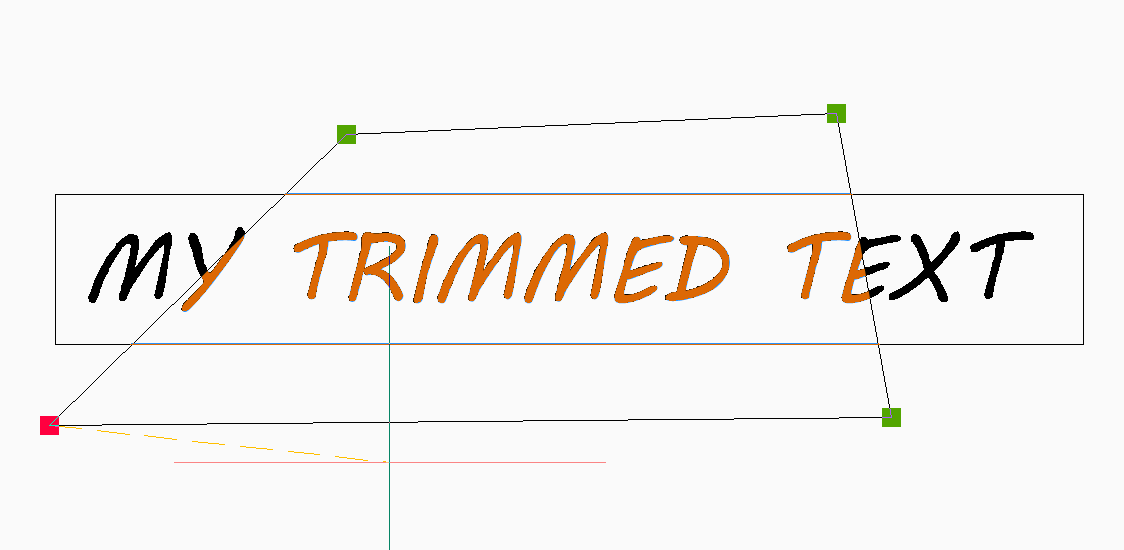
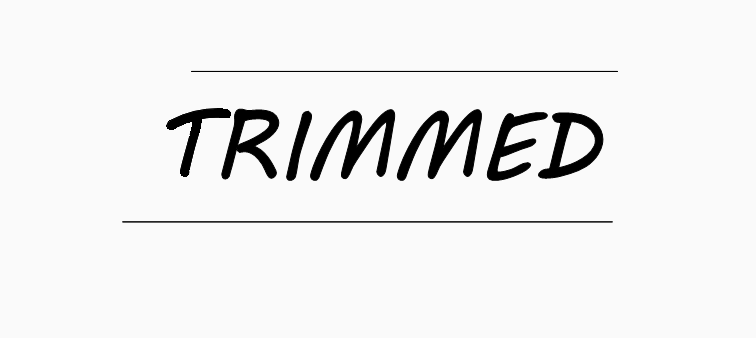
You can quickly create a block by selecting the text then going CTRL + C to COPYCLIP, then CTRL + SHIFT + V to PASTEBLOCK it back in a block.
Jason Bourhill
CAD Concepts Ltd
0
