REDO History Protection

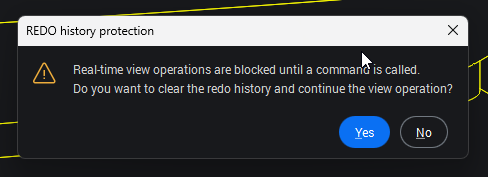
Just upgraded to V27 and what a mess it is. Now I'm getting this whenever I try to undo actions. What is it, why am I getting it, and how do I turn it off?
Comments
-
I suppose this note in the Release notes is about it:
UNDO
Added a guard to protect REDO data from an accidental reset after many undo steps. We only guard against real-time view operations. The guard is enabled after 10 undo steps.
0 -
Thanks for the info, but as usual, that explanation from BricsCAD is clear as mud. I've been using AutoCAD since 1995 and have never had an issue with too many undo steps.
0 -
I still don't get why View Navigation is part of the UnDo stack at all.
(Every single separate step including scroll wheel's rows zoom steps in the past.
Looks like all View Navigations in Bricscad meanwhile get grouped - which is already a step ahead)
My first CAD had extra View Undo/Redo buttons if ever needed, the second CAD had at least an option to exclude View Undos partly or completely and I can't remember to have seen View Undos in any 3D Apps at all and i never missed it ever.The problem is not really about extra redundant Undo steps, it is mainly about that I am never interested in returning into such past view orientation.
0 -
I 100% agree. Never in the history of using AutoCAD have I relied on "Undo" to get back to a previous view.
0 -
Yes it's ludicrous, timewaster, often hard to see when it actually jiggles itself back to the actual geometry change you're interested in. Should at least be a configurable option, to instead undo actual geometry regardless of view changes. People have complained forever - nothing even acknowledged - don't tell me it's the old do-nothing excuse - Autocad compatibility.
0 -
Changing the view changes the database. Changing the view in AutoCAD also creates an undo step.
0 -
I'm sure, but a simple algorithm (let alone AI) should be able to filter view changes from geometry changes, within the database?
0 -
At least BricsCAD seems to be addressing bugs within the software, unlike Autodesk. I reported at least three bugs with 2024 and Autodesk told me to essentially pound sand. It seems like AutoCAD is a "dead" product to them and Revit is getting all of the love now.
0