Drawing recovery pop-up

Comments
-
Hi Martin,
Right-click on the folder(s) in the Drawing Recovery Panel and select Remove to remove the folder from the panel without recovering the files. This will clear the contents of the panel, and the recovery message will no longer show up next time you start BricsCAD.0 -
Hi, I have to agree with Martin. The drawing recovery manager opening every time a new instance of Bricscad is started is annoying. I run a small design company and I have heard this complaint from all of my employees. Current versions of Bricscad are V26.1.06 and one PC with V25. Windows and Linux operating systems in use. All 12 copies have the same annoying problem of the Drawing recovery panel opening on startup. Is there anyway to stop this? So the drawing recovery panel ONLY opens when requested. Thank you for any assistance.
0 -
It doesn't open every time for me, just 'as needed' maybe - if it does, there's often enough a reason to be grateful.
0 -
Did you try to remove all folders from the list in the Drawing Recovery Panel, as Rose suggested above? The panel will appear after any crash as long as there are files listed in it.
0 -
I also agree with Martin. Bricscad quite often crashes (at least once a day in my case). Practically I do not check recovery files, used for many years working with cads, to save files after important modification of the drawing. Removing each time not wanted files is annoying. In my opinion recovery panel should be available on demand.
-1 -
The recovery panel being annoying is a symptom, maybe report the crashing?
CTRL + S should be the shiniest keys on the keyboard lol.
1 -
Crashing is sometimes reported automatically. I have no time to report each Bricscad crash, there are too many of them (today I had ~5 crashes, working with quite big 3D models). It is not problem of Bricscad version or computer – similar effect I have on other computer and Bricscad version (although I admit that latest version is slightly more stable than for example 24.04 – at least in my type of work). In addition effectiveness of bug report is problematic. Some of them are corrected, the others not - e.g. two years ago, I reported that there is no possibility to remove objects from selection in extrusion command, unfortunately without effect.
On the other hand, I would suggest to implement possibility to delete all recovery files with one command, not one by one.
2 -
Hi @jbn1 , it's worth to be reported as a feature support request.
0 -
If you can find where the recovery file list is kept then could say delete the files, it is more than likely in the registry, but you will need say a .Net delete entries in registry. Would run as part of a bat file clean up recovery then call Bricscad.
You can edit the Bricscad desktop icon to run a bat instead. Have done this but edit a copy of the icon in the desktop. Then can have a normal and a clean choice.
0 -
ALANH, thanks for hint, probably I would try to use vlisp to modify / delete recovery files list, however at the moment I have more important problems to solve.
0 -
I think I found it, but you need to check does it exist before starting Bricscad
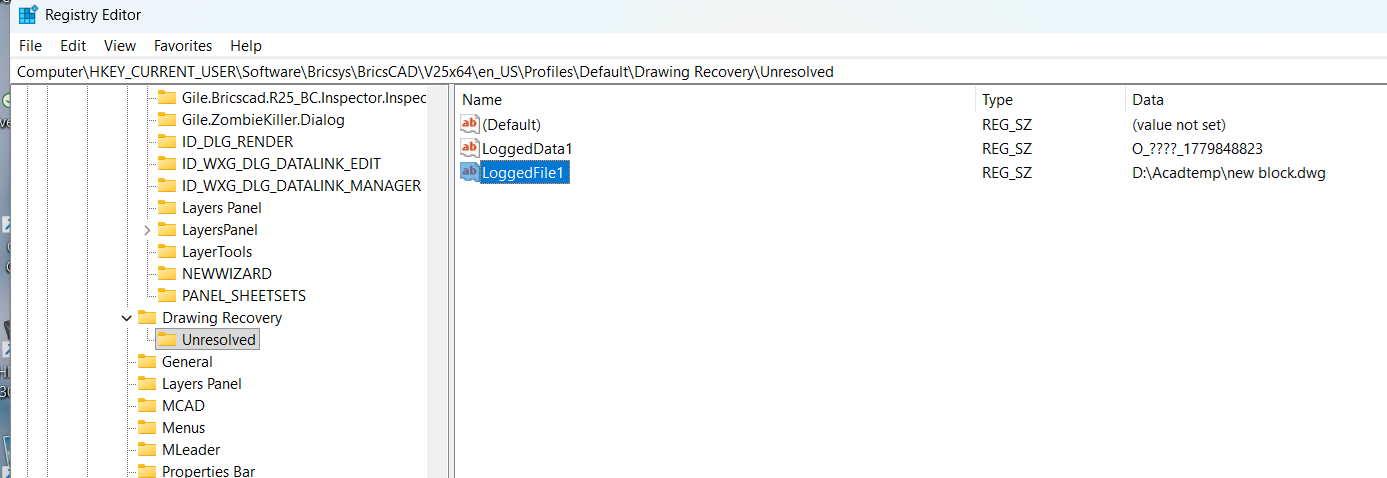 0
0 -
Hello again, I still have not found an answer to this problem. The Drawing Recover Manager should be a panel that the user opens as required. Bricscad, does crash quite often. The comment about the Ctrl + S being polished keys is quite accurate. If I delete the files the next time I open the drawing, again the recovery manager will open automatically. Is there anyway to stop this? So the drawing recovery panel ONLY opens when requested. Thank you for any help with this annoyance.
0