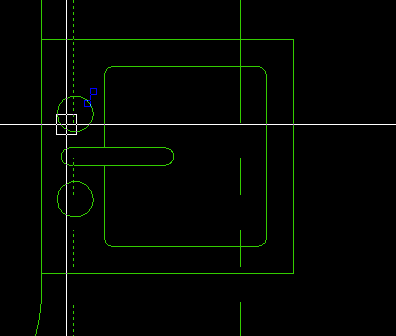
Unknown glyph at the cursor

This is new to me. This is in a drawing I just received. Is shows up on things like structural beam linework elements (the beam symbols have been exploded) and circles representing the handles at sinks. Can anyone tell me what it is? Is there a way to turn it off, or better yet, remove it completely? I'm seeing thins on V26 latest.
Comments
-
Martin,
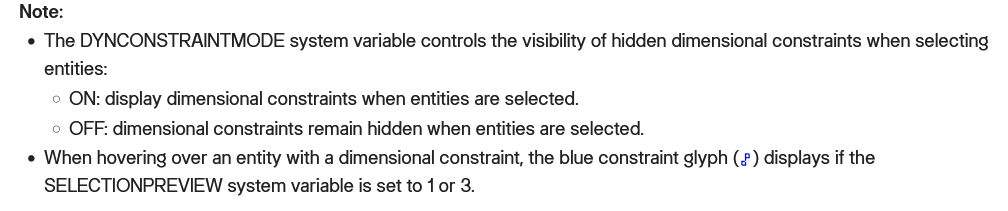
From Bricscad help.
 0
0 -
David,
Thanks. I miss the days when things like this were findable in the documentation.
0 -
Not every thing is findable in older Acad there were some undocumented features or commands.
One I think was removed in a support path could do D:\\alan\\lisp.. I think it was dbl period meant include subdirectories. Will have to look for it again. Not documented, maybe now.
One not in Bricscad V25 and a handy tool "Lisped" for editing text. It shows text in a edit dcl.
0 -
At one time Bricscad had a pdf version of the LISP documentation. They may still, but I can't find a link. Searching in a local pdf is much faster than online andI have a higher success rate than with the online system. The search function for the current online help is good if you know the name of what you are searching for. It is not so good when you don't.
At one time Ralph Grabowski wrote "Customizing Bricscad" for each version. Those were excellent references.
Before I posted here I tried AI. That included uploading a screen shot of the glyph. AL had several things to try, but in the end it could not identify the glyph.
0 -
Wasn't there an old adage that said Programmers should never write the manuals :-)
I would find all instructions so much easier if there were a picture associated with every instruction.
How many times has the help (not necessarily Bricscad) said press button A, then button B and then tick the box. If you don't know where button A is or what it looks like, you are lost before you even start.
I must add that having the command search at the top right of Bricscad itself, which tells you where on the Ribbon a certain command is.
Is very helpful.
0 -
To quote that famous person Homer Simpson, "Where is the any key"
I am lucky I have a full paper set of R12 Autocad books including lisp Dcl etc some 5 books. Also have an original big fat How to use R12 Autocad, handy for some one just starting with cad and has no idea of command names. Just being able to flick pages and go thats what I was looking for. Similar with say a PDF.
I also have 4 books by Reinaldo Togeros as ebooks nice thing is can copy and past code examples. They were cheap on Kindle.
0 -
Just in a case, offline Help files for the current and previous BricsCAD versions can be downloaded here:
They include Product Documentation, Command Reference and System Variable Reference, but not Developer documentation.
0 -
I didn't know Help was available as pdf. It does seem to be different from the online version (it needs to be!) - time will tell if better. The pdf version is not an update of the brilliant way they were up to v16 (I have that as pdf), full of context and explanation, less today's systematic (robotic?) pattern which makes perfect sense if you're already familiar with the answer.
0