Hatch Behavior

Before asking this new question, I want to thank everyone who has responded to my other recent posts. I've been travelling for work and therefore haven't had a chance to go through them all, but I will be doing so shortly.
This question is in regard to what appears to be the requirement for the entire area I am trying to hatch being visible on the screen before the hatch can be applied.
For instance, if I have a very narrow, but long area that I want to hatch, I can't just zoom in to place my cursor inside of that narrow area and then apply the hatch. I have to ensure the entire area that is inside of that boundary that I am trying to apply the hatch to is visible on the screen.
I have to imaging there is a setting somewhere that will allow me to apply a hatch inside a boundary regardless of whether the entire area inside of that boundary is visible at the time the hatch is applied.
I do not remember the other CAD programs I've used over the years behaving this way.
Comments
-
I think that's how it is. It's also a problem when trying to select a whole floor plan of walls and partitions, then extrude them up as a single solid. The whole lot has to be visible on screen. But then the width of the walls is too tiny to accurately select, without zooming in. What's worse, the mouse selection box, whatever it's called, has to be small enough to fit between the walls. Which it is when zoomed in but not when zoomed out. The solution in both your and my cases, is to temporarily divide the whole up into smaller bits, then hatch/extrude them separately - which can be selected as a group by panning around.
0 -
Long skinny areas often had to add a dummy line across the gap, so could hatch say in 2-3 goes. trying to "JOIN" sometimes was just as frustrating.
0 -
I don't draw building plans, so I don't really have much knowledge of what you are experiencing, but there are a couple of autolisp routines out there that might help.
Without anything to test how they work (if you could attach a before-and-after drawing, it would be helpful), there is a routine from Lee Mac called Chain Selection, which will select entities touching each other end to end, even when they are off-screen.
There is also a Merge Hatches routine (by Juan Villarreal), which will merge multiple hatches into one.
Also, the built-in Enable Boundary Detection might help.
As I say, I don't know anything about Architectural drawing, but hopefully one of them might help.
0 -
Hmm boundary detection, will try that. But to me it's not a problem.
0 -
Hatched wall,
I tried HPGAPTOL worked in some situations.
Else need to select objects. I used layiso to isolate the layers then select entities inner and outer line work no plines.
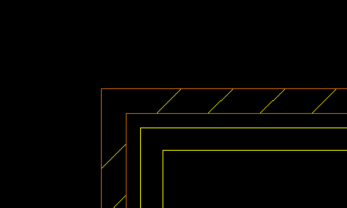
If working at full scale hatch can not detect a pick point.
Still waiting for a non working sample.
0

