Why does this parametric block break when I copy it?

I can insert the block just fine, but as soon as I copy it, the rotate parametric operation completely breaks.
Comments
-
I don't use blocks like dynamic blocks, but do you not need to add coincident constraints to keep everything together?
0 -
Thanks for the suggestion, but it didn't help. Something with the scale operation is breaking it.
0 -
@jcclow, I inserted your drawing and then copied it a few times,
and it scaled, rotated and stretched without any issues.
I have attached the drawing with your blocks in.
As I said, I don't use dynamic style blocks, so I may be doing this wrong.
Excuse my ignorance, but I also know nothing about breaklines, so why, when you stretch it, does the squiggle part scale up as well?
I would have thought that was what your scale action was for?
Apologies for my stupidity :-)
0 -
Hey David,
Thank you for taking the time to look into this. I opened your drawing and as soon as I stretched and rotated one of the blocks, it broke. I've attached a screenshot.
I added the scale feature so that if I have to show the break line for a larger drawing, I can scale it up to where it "feels right". I probably don't need that, but it's a nice to have.
I actually had another block break, so I opened a ticket. I don't understand why the origin of the rotate feature is moving when it's not a part of the stretch selection set. Parametric blocks feels like a half-baked feature. I've been using AutoCAD since R13 and have been building dynamic blocks since they came out, and feel I have a really great understanding of how they function, but parametric blocks are a completely different beast. I'm hoping the ticket gets a reply and Bricsys can help me figure out what's going on.
Just for fun, I attached the other block I'm having an issue with. This one is fully constrained, yet still falls apart when manipulated.
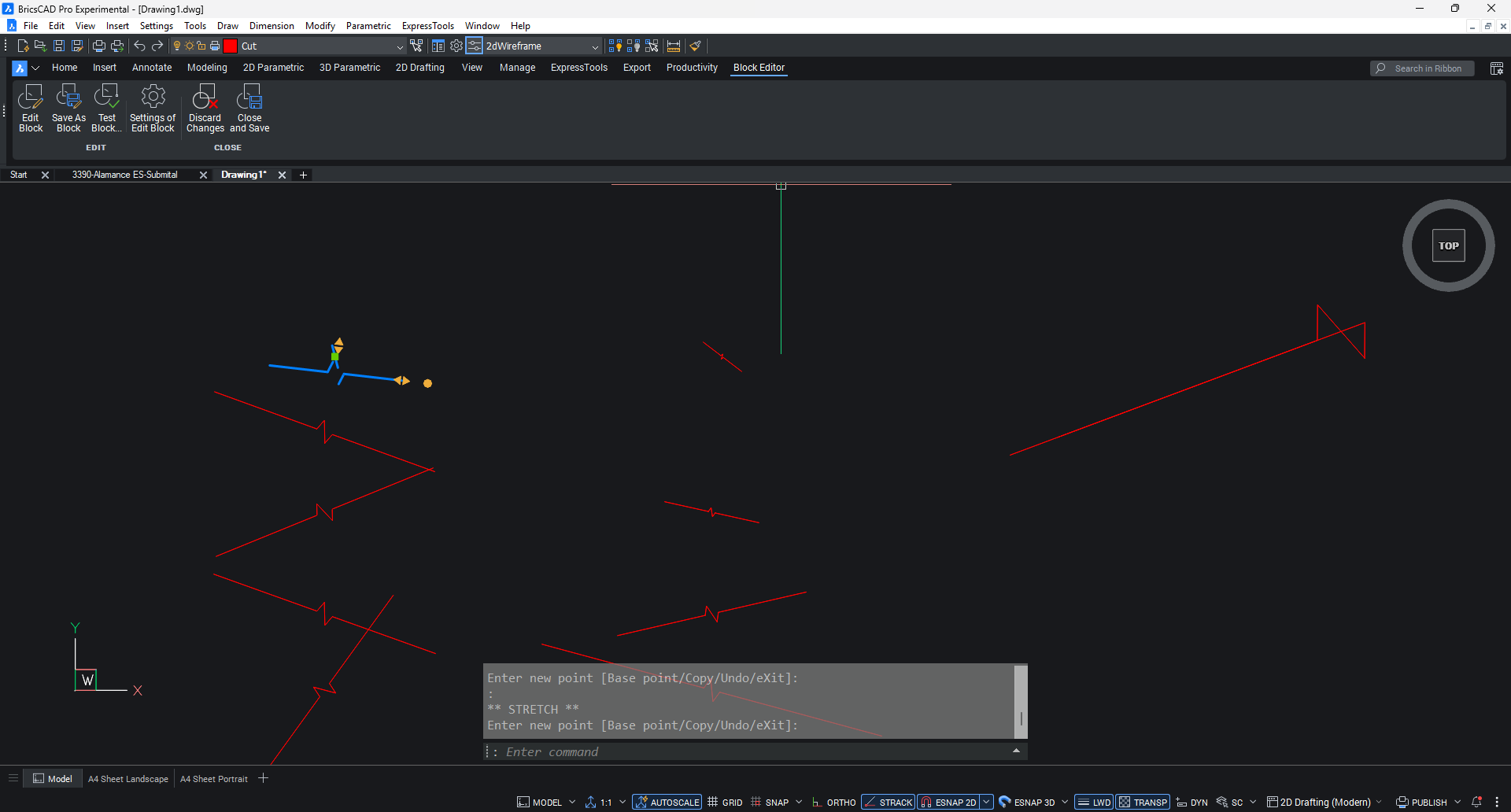 0
0 -
Hello.
Maybe using a simpler geometry and parametrization could be a solution for this case - see attached.
This would allow to separate the selection sets of operations and make it easier to get the result as expected.
This means that the effects of operations will no longer overlap.One reason for such an approach is that the point of application of an operation might also move, depending on selection sets.
For example, with the original configuration, the rotation grip moves when stretching.
However, this also moves the rotation center, which, further, has a negative impact on the geometric configuration.Another important factor is the underconstraning - this can lead to configurations that are correct but not as expected.
Concerning using grips, if you have access to dynamic blocks, you could experiment using them for cases like this - they include more grip functionalities.
0 -
For the Zig zag there is plenty of lisp's out there that draw a zig zag rather than dynamic block. One by CAB has different zig zag styles as options.
0 -
The zig zag isn't the point. The block denotes a break in a wall or other object and needs to be scaled depending on the object's size.
0 -
I reached out to BricsCAD support and the "Fix" constraint was breaking the block.
0
