trouble picking a node to act on it

This is common to Ver 18 & 25
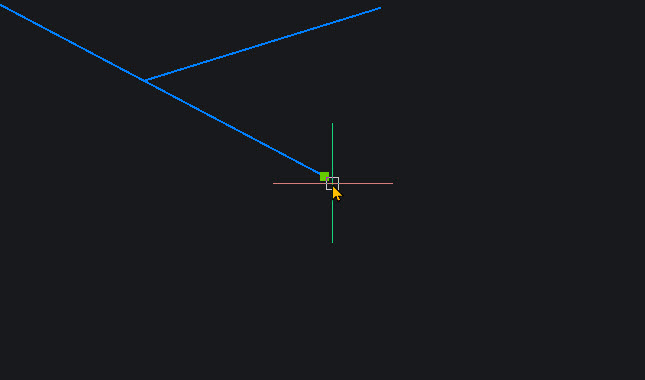
I see when I mouse over a node it is difficult to actually select such to drag the node about.
I would assume the pick box should grab that node once the box overlaps any part of the node. Doesn't seem to work like that though.
Have looked at a few settings but can't get it to improve what I would call 'its magnetic attraction' if you get my drift.
I have changed my mouse batteries, cleaned the mouse to isolate any issue associated with such. And tried another mouse - 2 others
help is much appreciated thanks
Comments
-
Is it possible that the drawing is far from Bricscad origin and/or that your zoomed in heavily in that screenshot (?)
(So exceeding the resolution … ?)
0 -
Same as I said just now on 'Rounding up drawing deviations' - Snapping inaccurate - try
0 -
Thanks folks. I wrote a reply and posted but it showed garbage.
I grabbed a screenshot when I tried to edit and post that 0
0 -
Update. I see if I zoom in close relatively close (whatever that means 🙂) it doesn't pick the node.
But when zoomed out a lot further it latches on then I can zoom in and accurately position the node where I want it.
So have what seems like the solution but it'd be good to just click and move from a somewhat closer zoom.0 -
Update: I think I found the culprit
Mouse settings has and option 'enhanced pointer precision'"
I stumbled on that when Windows updated and wiped my mouse and once I got it going it worked abysmally slow.
Looked at settings and saw the option.
I clicked it ON and it definitely works as I was accustomed to and grabbed the node very quickly and easily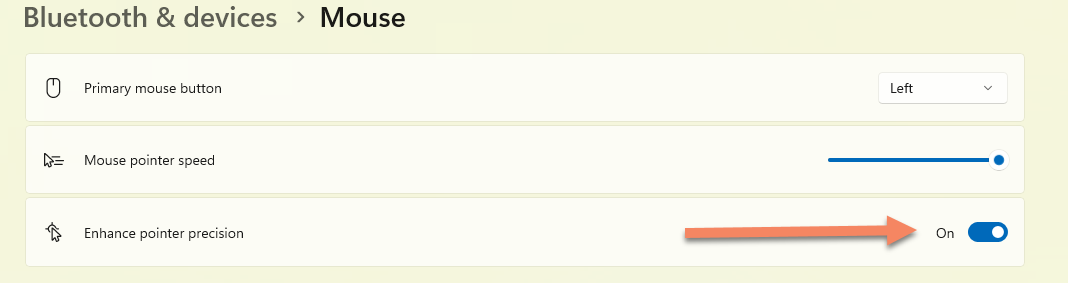 0
0 -
Good to be 'pointed' to the mouse cursor - source of some frustration, I realise, incl sometimes obscure tooltips etc, can be improved, incl downloaded transparent or outline designs.
0 -
It sure was a relief
Such and instant and dramatic change0 -
It’s not the culprit, it’s BricsCAD’s snapping implementation, which is jittery, wobbly when it gets close to the node. It happens countless times every day.
It’s been like this for years, over a decade and hasn’t improved.
I have AutoCAD 2027, ZWCAD 2027, GStarCAD 2027, all these of these apps and test them back to back, they all snap without the jittery nervous behaviour that BricsCAD has. They all feel positive and reliable snapping. All of these clones were built on the same codebase IntelliCAD for the early 90’s, only BricsCAD built more custom in house code.
Interesting, side note, snapping in apps built in the early 2000’s (Microsoft Office Ribbon era) are WPF, Revit is an example, snapping feels very much different again, softer and more reliable.
BTW the screenshot of the first post shows a grip, not an end snap. There’s ‘GripSize’ which can be increased, lets say to size 8, that may make it easier to select.
1 -
The important thing is that grip size and snap icon size are both a lot smaller than the mouse pointer box. Snap uncertainty comes when you think the grip or snap is within the mouse pointer's box when you click, but it's only nearby. With a smaller pointer box, they seem to coincide but often don't. As long as the grip or snap are inside the pointer box, all is well.
1 -
Sorry been elsewhere diverted and missed these posts.
x4x i concur
I have MicrosurveyCad for my surveying - Intellicad engine
And it is much different. Snaps are just that - much snappier and probably what coined the phrase
But that mouse setting was seriously influencing this and I assumed it to be that.
Appreciate your chipping inTom I played with the Pickbox (12 now 20) and Gripsize (4 now 10) and it certainly improved things but when zoomed out it looks rather odd with the highlighted nodes consuming a lot of screen space. Will play more.
But with said settings I zoomed in and as seen, held the mouse over the text. I expected it would select the text and the polyline, But only way to get the text is to zoom in and select it between the linework.
Not what I would expect.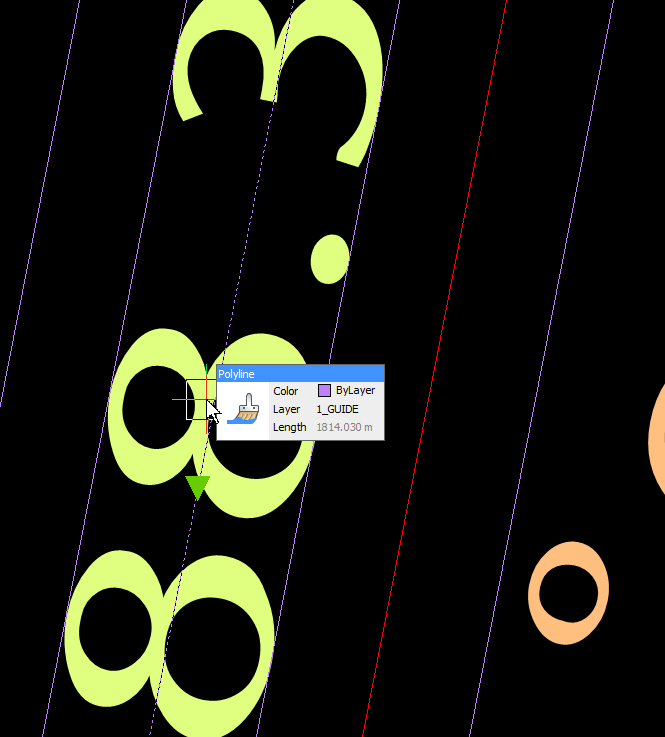
Edit:
I also have Canvas GIS - a vector graphics that does cad and GIS stuff.
Just played with that. Hadn't used it for a while
Wow! The snap, grip associated with that is amazing. Instant, no hesitation.
Blazingly fast!
If only Bricscad and Intellicad for that matter were so switched on in this areaOn another side note but as you mentioned the other x4x, it is interesting how for egs Bricscad is blisteringly quick with my 350+mb georeferenced aerials but Intellicad bogs down and locks up. Latter just wont handle them.
One of main reasons I also have Bricscad plus a local reseller added a suite of surveying routines etc to make life easy to draw our Titles Office plans
Ramble Over 😊0 -
Is this a wired mouse or a wireless mouse, if the latter connected with a dongle/receiver or via Bluetooth?
Both my 3Dconnexion CAD mouse and my Dell wireless mouse do not show this option, all it shows is the wireless receiver (3Dconnexion keyboard or dongle, Dell dongle). I prefer not to use Bluetooth on my computer to prevent other devices' Bluetooth connections jumping over to the computer and losing connection to what they should actually connect to.
0 -
wireless Logitech mouse. It's few years old but works well. Connects via a dingle/receiver.
0 -
Thanks for the info, then it could be a matter of the mouse driver not accessing that function or it is specific for the Logitech mouse.
I have an older Logitech wireless mouse lying around and will test with that to see if this additional mouse pointer option will show up or not on my system.
0 -
can't be specific on model, but it's not featured in upgrades of drivers,despite logitech telling me the driver is out of date and wanting me to update. The driver software still let's me set buttons etc. I think it's wanting me to buy the latest 😀
0

