Setting the layer properties in a paper space viewport

Each of my layout tabs have just one viewport.
I'd like to set up each of those viewports with a custom set of layer properties, so that no matter what layers I have turned on or off in model space, the layout tabs and the viewports on them will always have the layer properties I want them to have.
For instance, the main floor plan would not have the layers visible that would only pertain to the reflected ceiling plan and vice-versa.
I've watched several YouTube videos and also tried to follow the instructions in the BricsCAD help system here:
Based on those videos and the BricsCAD help topic, I think I have a pretty good understanding on how this should work, unfortunately though it is not working like that for me.
As a new user of BricsCAD and being a CAD novice, I'm confident the issue is with me, but I just can't figure out what I may be doing wrong.
I double-click inside of the viewport and then set the layers just the way I want them. I double-click outside of the viewport and everything looks great. However, as soon as I go back to work in model space and make any changes to the layers there, when I go back to the paperspace layout tab the visible layers are all messed up.
I'm looking for a way to permanently set the visibility of the layers in those viewports, so that no matter what the visibility status is on the layers in model space, the viewports always show the layers I want.
Any help would be appreciated.
Comments
-
You may need a Lisp or a script that runs the vplayer command. Say freeze all layers except one then thaw all the layers you want.
It is pretty easy to make a layer list to say a text file that is read with the names of the layers you want thawed.
Have you looked at using vplayer in a lisp ?
This will take all layers and dump to a file.
(defun dumplayers ( / layers lay fo fname)
(setq Layers (vla-get-layers (vla-get-activedocument (vlax-get-Acad-Object))))
(setq fo (open "d:\acadtemp\VPlayers.txt" "w"))
(vlax-for lay layers
(write-line (vlax-get lay 'name) fo)
)
(close fo)
(princ "\nAll done")
)
(dumplayers)0 -
Hello @DIY_Guy ,
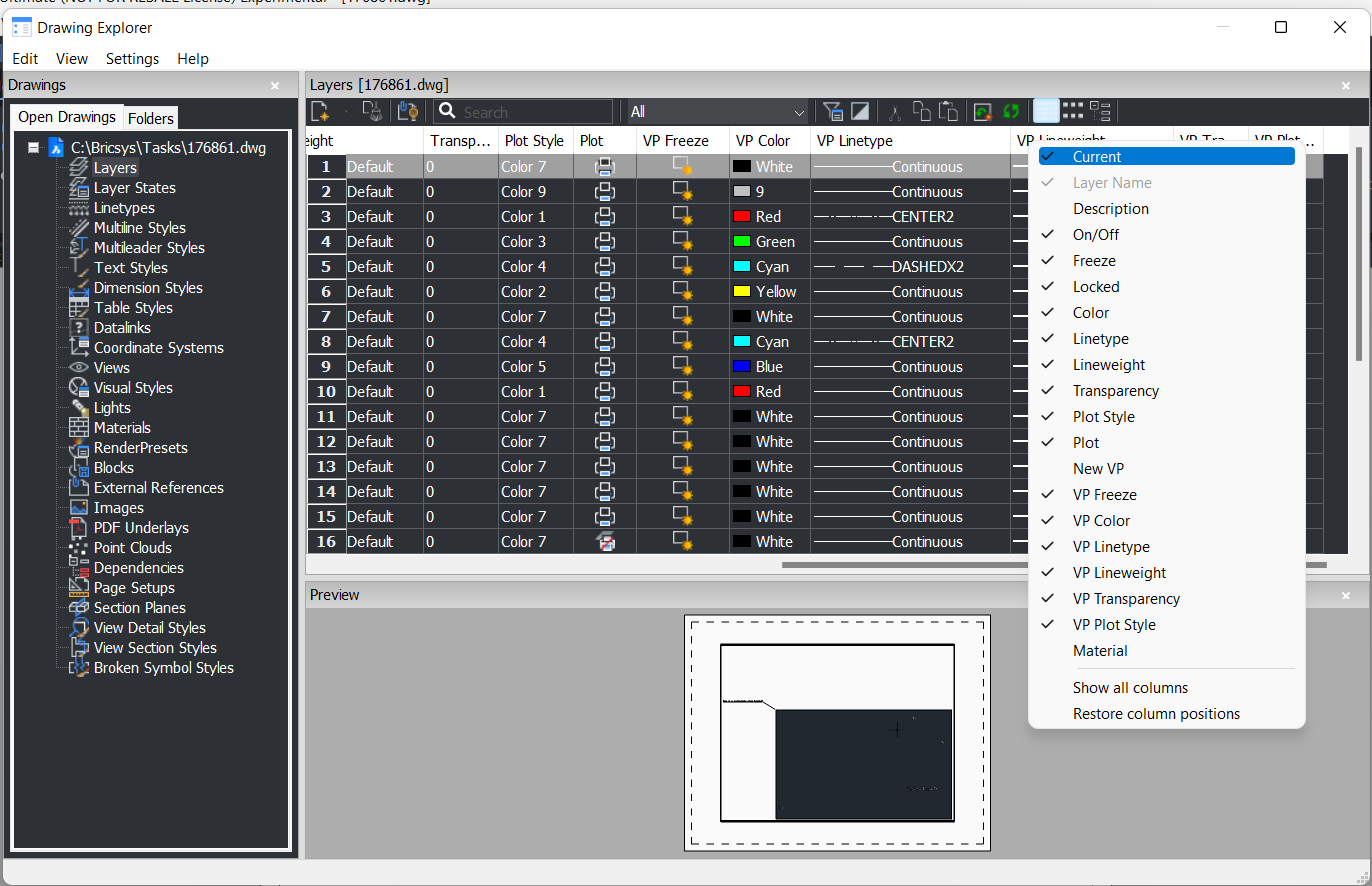
You said:"I double-click inside of the viewport and then set the layers just the way I want them." Do you use VP overrides or common properties? You need to use columns named like VP Freeze, VP Color, etc. to set viewport overrides. If these columns are not displayed, press right mouse button on any column header and choose which properties you want to display.
 0
0 -
Oh —- so that's what those VP columns are for
0 -
Yes ) A bit more information about that VP properties you can find in this article:
0 -
Thank you for the suggestion, but my head is already about to explode.
I've been using 2-D CAD programs for about 25 years, but really only working in Model space with no formal training. Last November I ordered a 3D Spatial Camera (LiDAR) and have been coming up to speed on how to work with point clouds and 3-D over these last months.
That journey started out by trying out the UNDET Plug-In for my copy of ARES Commander, which eventually lead me to switching to BricsCAD.
So, on top of switching to BricsCAD, I've been trying to learn how to use Layouts and Viewports, which is something I've not really messed with before.
I need to get things figured out to the point that I can complete this project I'm on before tackling additional new skills like scripts.0 -
Lyubov Osina, I started off just trying to use the On/Off, but then after watching the various YouTube videos and searching the BricsCAD help articles, I switched to using the VP Freeze column.
I'm not trying to do anything fancy here, I just want to be able to have various layers visible or not visible. I'm not trying to adjust any Linetypes or colors, etc.
The only way I've been able to somewhat automate adjusting the visibility of the layers is through the use of Layer States. I went ahead and created a specific Layer State for my first few Layout Tabs and I would go into Model space, select the Layer State I needed for a specific Layout, then go back to that Layout Tab and Print To PDF. That works fine, but I was hoping to find a way to permanently set a custom Layer visibility state for each of my Layout Tabs, so no matter what layers I had turned on or off in Model Space, I could print any of my Layout Tabs to PDF at any time without having to customize the visibility of the layers first.
I have been assuming that going back into Model space and then selecting a different Layer State has been what was screwing everything up, by me somehow having the wrong boxes checked or not checked in the "Layer Properties to restore' section of the Layer States options (that and/or the options under the "Restore options".
However, I've adjusted those settings in various ways without success, so I may be barking up the wrong tree thinking this is where I'm going wrong. I'm leaning towards believing this is not my issue, because even if I just go back into Model Space and without selecting a different Layer State, but just by turning off one single layer in the Layers panel, it turns off that layer in the Viewport of the Layout tab even though I had previously that layer turned on and the VP Freeze is unfrozen when setting up the custom layer properties through the Viewport.0 -
"custom Layer visibility state for each of my Layout Tabs" you are right go into a viewport then use the VP column to turn on or off actually I think you will find its freeze or thaw.
Using a lisp you can say call up a list of layers that you want thawed, after doing a VP freeze "*" for all, then thaw what you want
Copy this to command line when inside a viewport change the layer names seperated by a comma.
(command "vplayer" "F" "*" "" "T" "0,Design-Drainage-Invert" "" "")So if you use what I posted above to make a text file, you can then make new text files that have say layout style as "name.txt". Then read the correct text file. Yes could put all layers as separate lists in a lisp program. Then call correct list, possibly go that way.
So if you make the files and post here can do something for you. I think a zip is accepted.
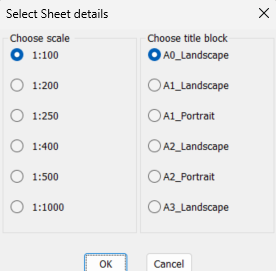
Using layouts you will never look back. There are so many create layouts quickly lisps, I have made like 40 in one go, walking along a long road. Or just pick a point in Model enter title block and scale, layout is made. What industry are you in ? What would normally be in a layout. Could add to this what style layout.
 0
0 -
Thank you everyone for your input on this.
I've truly been stumped on why things weren't behaving as I thought they should. I went so far as to open up my file in a different CAD program (ARES Commander) to see if it would behave there as I thought it should, but it behaved the same way.
Trying to get past this hurdle is all I've been thinking about and I've definitely lost a few hours of sleep over it these last few days. Finally, last night as I was lying there trying to sleep, I had an epiphany.
Epiphany is a term I don't use lightly and before using it here I did an Internet search to ensure I wasn't using it improperly. While it seems the term is rooted in religion, it is commonly used as I am using it here.
A sudden, illuminating realization or insight into the true nature or meaning of something — for example, “That moment when you suddenly understand a complex idea”
I feel like a complete idiot though, as now that I believe I have the proper understanding, the idea I failed to grasp is far from what I would call complex.
What I simply failed to understand is that using the VP Freeze through a viewport can only hide a layer from view. If the layer is not turned on via the light bulb in the On/Off column of the Layers palette, it is simply not going to be visible in the viewport regardless of any custom viewport settings I've made (even if the light bulb was turned on when I made those customizations through the viewport).
This is such a simple concept to understand that I'm sure all of you trying to help me didn't even think to suggest this as being my issue, but it was.
My understanding now is that I just need to go into Model space and ensure every single layer is turned on before I go into any of my layout tabs for printing.0 -
Yeah but you may not want to be seeing all of your layers, in Modelspace
0 -
Simple
(setvar 'ctab "Model")
(command "-layer" "T" "" "On" "" "")Again if you spend the time making the layers to be visible as a text file something can be done for you, could put it all in one text file with the 1st line in group as name of group, with a single space separating the groups.
Group1
0
C-POWR-NPLT
C-POWR-OVHD
C-PROP
C-PROP-BNDYGroup2
C-PROP-BNDY-PATT
C-PROP-CURV-LABL
C-PROP-LABL
C-PROP-LINEGroup3
C-PROP-LINE-LABL
C-PROP-LOTS
C-PROP-RSRVThere is ways of putting these groups into lisp code wont go into that now need a txt file.
0 -
I don't think what you're describing is possible in a single drawing file without having to repeatedly reset layer states.
To achieve what you're looking to do. You would need to look into using xrefs. If you create a separate drawing file for each paper space layout and xref your source model into it, then each of these drawings can have their own independent layer settings in model space and paperspace.
0 -
Your correct. Layer setting changes in model space are global, applying to all vports. VP layer settings are for just that specific vport.
You could use layer states to quickly turn the model space layers on but you have to remember to do so before you print.
The xref option I mentioned gets around this as it allows you to have different model space layer settings to the source model.
0 -
quote: You could use layer states to quickly turn the model space layers on but you have to remember to do so before you print.
But if you Restore a LayerState while in a viewport, you will VP-Freeze all the layers that are specified as Off in that LayerState. That will make those settings permanent in that viewport; so you only have to do it once. Before printing, just turn on all layers in the model tab, using the LayOn command.
0 -
We used lisp plot programs so yes could make a layer list of all current settings in model, do plot then reset layers back to last working settings, still waiting for DIY_Guy.
0